
A React notification system delivers real-time updates, alerts, and messages to users inside a web application. You can build one from scratch or use a third-party tool like MagicBell. This guide covers the costs of each approach and shows how to add notifications to your React frontend in minutes.
Know what goes into building a React notification system before you pick a solution. Weigh the buy-versus-build options carefully. For the purposes of this article, we focus on the frontend side.
Here's what we cover in this guide:
-
The expenses of a custom React notification system
-
The benefits of a third-party notification solution
-
Integrating MagicBell into your React frontend
Introduction to React Notifications
React notifications are a key part of any modern web app. They deliver timely updates, alerts, and important info directly to users. A well-designed notification system keeps users informed. It also plays a big role in boosting user engagement.
You can display simple toast notifications for success messages. Or you can build a full notification center. The right approach makes your app more interactive and responsive.
With react notifications, developers create a smooth experience. Users stay active in the app, respond to critical events, and never miss key updates. From new message alerts to system change notices, a solid notification system keeps users engaged.
Notifications in React come in many forms. Lightweight toast notifications give quick feedback. More advanced, fully customizable components handle complex user interactions. An effective notification system is a proven way to drive app success.
Types of Notifications in React
When you design notification systems in React, you need to know the different types. Each type serves a unique purpose and user experience. Broadly, notifications fall into two categories: stateless and stateful.
Stateless notifications are simple, one-off messages. They do not store info about past notifications. These work well for toast notifications, quick alerts, or success messages. They give users instant feedback without needing further interaction or tracking.
Stateful notifications keep a record of history and user actions. They power advanced systems like in-app notifications, notification feeds, or a notification center UI. Users can view, dismiss, or interact with past notifications. This makes them a great fit for apps that need persistent, interactive engagement.
Notification types also differ by how they reach users. Push notifications let you send messages even when users are not on your web app. In-app notifications appear while users are active in your app. Web push notifications use browser features to reach users across platforms. They keep users informed in real time.
Pick the right mix of notification types for your app. Toast notifications work for quick feedback. A full notification center handles ongoing updates. The right combo makes your system effective and easy to use.
The expenses of a custom React notification system
Before you commit to a big notification project, know what you are getting into. Notifications can snowball fast, and hidden costs add up. Tools exist to help you build a custom React notification system. But many do not offer what you need or force you to find extra solutions.
For example, browser support for the various APIs differs a lot. To reach all your users (including Safari), you might need multiple custom solutions. Backend parts are also critical for real-time updates and smooth user engagement.
Push API vs. Notifications API
Even if we look at just one type -- desktop push notifications -- there are still key choices to make. You can push notifications while users are on your web app. Or you can push them even when your app is not loaded. These two APIs do not have the same browser support and need different implementations.
Notifications API: The Notifications API sends notifications to users who have your web app loaded. It works even if the tab is not focused. Think of it as the web equivalent of mobile in-app notifications.
To get started, check whether the browser supports the API and request permission:
// App.jsx
componentDidMount() {
  if ('Notification' in window) {
    // API supported — request permission
  } else {
    // API not supported
  }
}
The requestPermission method is promise-based in most browsers:
Notification.requestPermission().then(function(permission) {
  // "granted", "denied", or "default"
});
But Safari still uses the deprecated callback method, so a custom solution needs to handle both:
// Safari uses a callback, not a promise
Notification.requestPermission(callback);
This means you need a secondary check for Safari in your permission request logic. And that is just the beginning of the browser compatibility issues.
Browsers have started blocking spam-like permission requests. Chrome introduced a quieter permission UI, and Firefox v72+ blocks all notifications that are not explicitly granted by the user. If users consistently dismiss your permission request, Chrome will block it entirely for your web app.
To avoid this, skip the native opt-in dialog. Instead, create a custom banner or UI element that explains why notifications will improve the user's experience. Only trigger the native browser prompt after the user engages with your custom UI.
The Notifications API also uses service workers to display notifications. Key service worker methods include ServiceWorkerRegistration.showNotification() for displaying notifications and ServiceWorkerGlobalScope.onnotificationclick for handling user interactions.
Push API: The Push API takes things further. After getting permission, you can send notifications even when your web app is not loaded. This lets you send marketing, sales, and promotional content at any time. Think of it as the web equivalent of mobile push notifications.
Unlike mobile push, which people accept as normal, web push is not as common. You need service workers and a server to send web push notifications. Third-party tools like Firebase Cloud Messaging or MagicBell can handle this complexity for you.
Browser compatibility challenges
Safari has only partial support for the Notifications API. The Push API does not support Safari at all. A custom solution for Safari users needs a separate approach using Apple's own method. For iOS push notifications, the Apple Push Notification Service (APNs) is required.
Safari's lack of Push API support is not an edge case. If a solid portion of your users are on Safari, you need to weigh whether building a separate Safari implementation is worth the effort. This is one of the strongest arguments for using a third-party tool that handles these inconsistencies for you.
Choosing between the two
The right choice depends on your users and your product:
- Cart abandonment or re-engagement: A user leaves your app without completing an action. A timed web push notification after 24 hours can bring them back. This requires the Push API.
- In-app guidance: A user navigates to a page and leaves immediately. The next time they visit, a browser notification can offer navigation tips. This uses the Notifications API.
- Real-time updates: A teammate assigns a task or sends a message. An in-app notification keeps the user informed without leaving the app.
A growing notification system
A full React notification system goes beyond desktop push messages. A request might start small with one notification type. But success often leads to requests for more types. A full system would likely include most or all of these:
-
Web push
-
Mobile push
-
SMS
A robust notification feed lets users access their notification history. This keeps engagement strong across all channels.
A custom web push solution needs multiple implementations to reach all browsers and devices. Mobile push needs a separate solution too. Both systems must handle permissions. They need service workers and a server to send notifications. You also need to handle it when a user revokes permission.
SMS and email notifications require you to collect personal info like phone numbers or email addresses. This means your system must comply with privacy laws like GDPR and CCPA. Getting compliance right is essential.
If stakeholders already have data on how certain notification types help the product, you are in a good spot. A more likely scenario: one type gets requested first. Based on its success or failure, it goes through changes or expansion.
Hidden costs
Sometimes custom solutions are the right call. But they come with hidden costs you must consider. Developers spend only about 32% of their time writing code. Taking on a custom React notification system that will likely grow is a big step.
Your time is already split between many tasks. Here are some hidden costs specific to notification systems.
We already mentioned that different browsers and devices support notifications in different ways. Separate custom implementations are needed to get full coverage.
After a React notification system is built, you will likely need A/B tests. You will test content, timing, and other variables. Testing different notification content helps you optimize user engagement. These tests make sure you send the right message at the right time to the right users. All that A/B testing data must be stored properly. A single source of truth keeps the data easy for teams to read. That is a lot to take on.
Takeaway
Building a custom solution gives you full control over design and implementation. But a homespun solution is usually more trouble than it is worth. Unless notifications are your core business, building and maintaining a system in-house is a big commitment.
The benefits of a third-party solution
A third-party tool handles bug fixes, browser compatibility, and most maintenance for you. These tools often include advanced features like customization options, programmatic controls, and animation support. As your notification system needs to grow, expansion becomes easier and less stressful.
Beyond the basics
Beyond permission requests and a message, third-party tools offer built-in features. You can add them as stakeholders make requests and the system expands. You do not need to build your own React notification system from scratch to succeed. Notification tools make notifications their business. They handle testing and maintenance of the core system for you.
Types of notifications: A notification system can expand beyond web or mobile push. Email and SMS notifications need different implementations and compliance checks. Third-party tools offer tiers or add-ons for new notification types as your system grows.
Segmentation: Segmenting users lets you send targeted, customized messages. Group users by language, location, and habits. Then notify those who benefit the most. Targeted notifications add value to the user experience. Building custom segmenting tools on top of custom notification solutions is a headache.
UIs for non-devs: Dashboards and UIs are a huge time-saver. They give stakeholders and non-devs ways to make updates and changes. Dashboards provide data insights too. You will not have to update notification copy, parse data, or relay info to the data team. Not building these tools in-house saves a lot of time. Loading indicators are built into many notification libraries. They provide visual cues during actions and improve the user experience.
Customization options
Third-party tools know that branding matters. So they offer customization options to match your brand style. Whether you start with toast notifications or a full notification solution, you will have options. Libraries like react notifications component offer a fully customizable component for adding notifications to React apps.
Brand matching: Fonts, colors, and icons can be added to third-party tools. This keeps your brand style consistent in the notification process.
Custom animations: Toast notifications and certain browser notifications offer room for customization and animations. This includes their badges. Third-party libraries often let you override the default CSS. This opens up full customization.
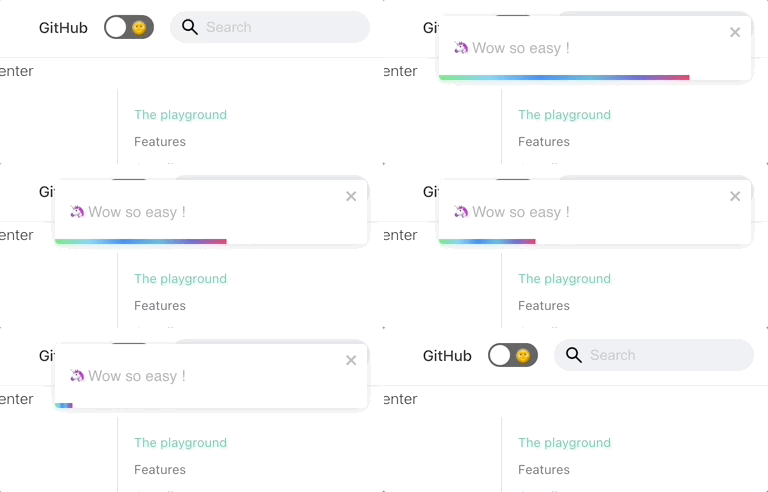
React-toastify* playground with fun style and animations*
Takeaway
On the surface, notifications might not seem like a big task. But they can get complex as your growth strategy evolves. Once you implement a notification system, it needs monitoring and maintenance. This can disrupt your development cycles. A third-party tool takes that burden off your team.
Integrate MagicBell into your React frontend
We will skip the back-end integration and focus on the frontend. Here is how to add a MagicBell notification inbox to your React app. You can set it up in a few short steps with customizable options.
The default Inbox spans the full width of the page when opened. You can control the height through properties.
// App.jsx

import * as React from 'react';
import Provider from '@magicbell/react/context-provider';
import Inbox from '@magicbell/react/inbox';

export default function NotificationDemo() {
  return (
    <Provider token={USER_JWT}>
      <Inbox />
    </Provider>
  );
}
The FloatingInbox is a tooltip. You can control its width and height through properties.
// App.jsx

import * as React from 'react';
import Provider from '@magicbell/react/context-provider';
import FloatingInbox from '@magicbell/react/floating-inbox';

export default function FloatingInboxDemo() {
  return (
    <Provider token={USER_JWT}>
      <FloatingInbox placement="bottom-start" height={500} width={400} offset={10} />
    </Provider>
  );
}
The Provider component uses the React Context API. It manages notification state across the app. This makes it easy to share notification data between components. It creates a MagicBellContext and keeps notifications updated in real time through a connection to MagicBell.
// Layout.tsx

import * as React from "react";
import Provider from "@magicbell/react/context-provider";

function Layout(props: any) {
  return (
    <main>
      <Provider token={USER_JWT}>
        { children }
      </Provider>
    </main>
  );
}

export default Layout;
Then you can use the Inbox component on any page:
// NotificationPage.tsx

import * as React from "react";
import Layout from "../components/layout";
import FloatingInbox from "@magicbell/react/floating-inbox";

function NotificationPage(props: any) {
  return (
    <Layout>
      <FloatingInbox
        placement="bottom-start"
        height={500}
        width={400}
        offset={10}
      />
    </Layout>
  );
}

export default NotificationPage;
Handling notifications well on the frontend ensures users get timely updates. It improves the overall user experience.
Custom themes
The MagicBell Inbox has many elements you can style with CSS classes. Override the default styles by adding your own classes in a CSS stylesheet.
You can style Inbox elements like:
-
Header:
magicbell--inbox-header -
Footer:
magicbell--inbox-footer -
Inbox Container:
magicbell--inbox -
Notification Item:
magicbell--inbox-item -
Buttons:
magicbell--button -
Floating Menu:
magicbell--floating-menu
Customizing the notification UI this way creates a responsive interface. It adapts to different devices and user needs.
body .magicbell--inbox {
  /* Text colors */
  --magicbell-text-default: #f5f5f5;
  --magicbell-text-muted: #9ca3af;
  --magicbell-text-link: #3b82f6;
  --magicbell-text-link-hover: #60a5fa;

  /* Border & background */
  --magicbell-border-muted: #374151;
  --magicbell-bg-default: #111827;
  --magicbell-bg-hover: #1f2937;
  --magicbell-bg-active: #374151;

  /* Surfaces */
  --magicbell-surface-bg: #1f2937;
  --magicbell-surface-bg-hover: #2d3748;
  --magicbell-surface-bg-active: #374151;
  --magicbell-surface-text: #f9fafb;
  --magicbell-surface-text-hover: #f9fafb;
  --magicbell-surface-text-active: #f9fafb;

  /* Shadows */
  --magicbell-shadow-elevated: 0 0 6px rgba(0, 0, 0, 0.4), 0 5px 12px rgba(0, 0, 0, 0.6);
}

body .magicbell--inbox > :not(.magicbell--inbox-header) {
  scrollbar-gutter: stable;
  scrollbar-color: #4b5563 #1f2937; /* thumb, track */
  scrollbar-width: thin;
  background-color: #111827;
}

body .magicbell--inbox-header {
  display: flex;
  align-items: center;
  justify-content: space-between;
  border: none;
  padding: 12px;
  background: #111827;
}
See a full demo of the FloatingInbox implementation on CodeSandbox.
Takeaway
It is easy to request an API key and try out the React SDK in your own app or in a sandbox online.
Ready to grow notifications with MagicBell
MagicBell provides a fast, easy way to add notifications to your React app. Visit the documentation to see how to connect MagicBell to your back end and frontend. MagicBell also works with services like Firebase Cloud Messaging. This lets you deliver notifications across platforms like Android and iOS. Our notification inbox works with various SDKs and tools built for different frameworks. MagicBell supports building a real-time notification center for timely user engagement.