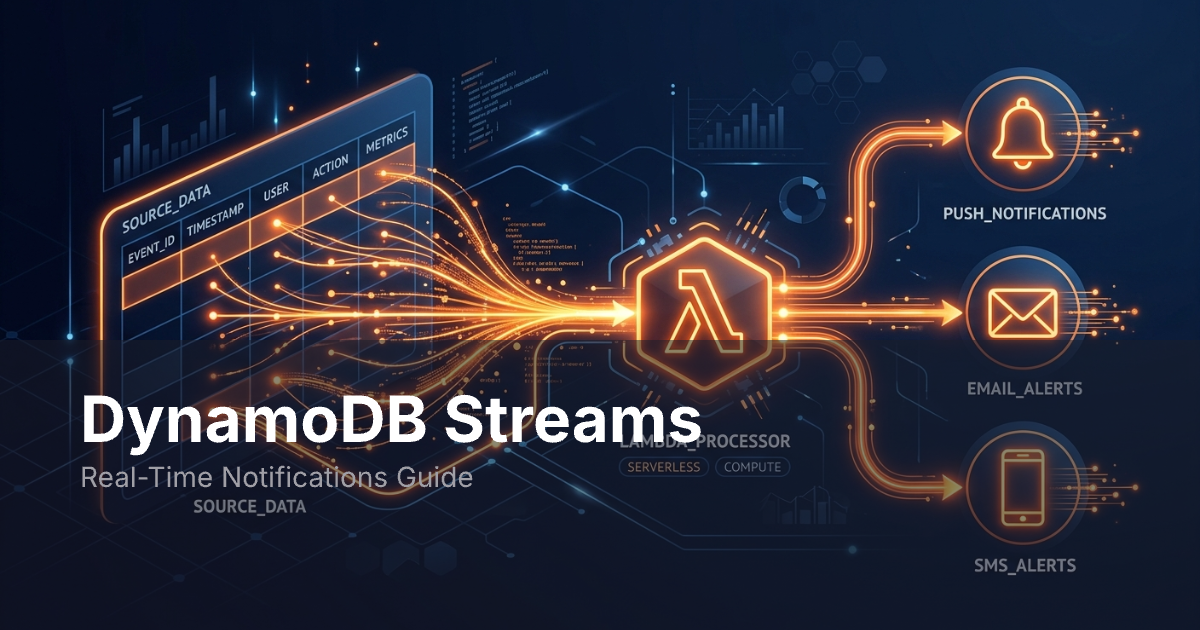
DynamoDB Streams capture every change to your DynamoDB table -- inserts, updates, and deletes -- as a sequence of records. Connect a Lambda function to a stream, and you get a pipeline that reacts to data changes in near real-time. This makes them a natural fit for sending notifications when something changes in your database.
This guide covers how DynamoDB Streams work, how to wire them to Lambda, and how to build a pipeline that sends messages across email, push, in-app, and SMS.
How DynamoDB Streams Work
You can turn on a stream for any DynamoDB table. Once enabled, DynamoDB writes a record for each item change. These records show up in the stream within a few hundred milliseconds.
Stream Records
Each stream record contains:
- Event type --
INSERT,MODIFY, orREMOVE. - Keys -- The primary key of the changed item.
- Images -- The item data before the change, after it, or both. This depends on your stream view type.
- Sequence number -- A unique identifier that preserves the order of changes.
- Timestamp -- When the change occurred.
Stream View Types
When you enable a stream, you choose what data each record includes:
| View Type | What You Get | Best For |
|---|---|---|
KEYS_ONLY |
Primary key attributes only | Lightweight triggers where you fetch the full item separately |
OLD_IMAGE |
The entire item before the change | Detecting what changed (diff against current state) |
NEW_IMAGE |
The entire item after the change | Notifications that need the current item data |
NEW_AND_OLD_IMAGES |
Both before and after | Notifications that describe what changed |
For notifications, pick NEW_AND_OLD_IMAGES. It lets your Lambda compare old and new state to decide if a notification should fire and what it should say.
Retention and Ordering
Records stay in the stream for 24 hours, then DynamoDB deletes them. Within a single partition key, records arrive in order. Across keys, there is no order guarantee.
A stream is split into shards. Each shard allows up to two readers at a time. Lambda manages shard reads for you, so you do not need to handle this yourself.
Architecture: DynamoDB to Notifications
The standard pattern connects four components:
DynamoDB Table --> DynamoDB Stream --> Lambda Function --> Notification Service
- A write hits the DynamoDB table (from your API, a batch job, or another Lambda).
- DynamoDB writes a stream record.
- Lambda polls the stream and invokes your function with a batch of records.
- Your function processes each record, decides if a notification is needed, and calls a notification API.
This is similar to how webhooks push data when events occur, but the trigger source is your database rather than an external service.
Why This Works Well
- No polling from your application. Lambda handles stream polling automatically (four times per second).
- Decoupled from the write path. The code that writes to DynamoDB does not need to know about notifications.
- Scales with your table. As DynamoDB adds partitions, the stream adds shards, and Lambda scales its invocations to match.
- Fits into a broader notification system design. DynamoDB Streams act as the event source layer in a publish/subscribe architecture.
Common Use Cases
Order Status Updates
An e-commerce app writes orders to DynamoDB. When the status field changes from processing to shipped, a Lambda function spots the change and sends the customer a notification with tracking details.
User Activity Notifications
A team app stores document edits in DynamoDB. When someone edits a shared doc, the stream fires a notification to their teammates. The Lambda checks user preferences first, so no one gets messages they do not want.
Inventory Notifications
A warehouse system tracks stock in DynamoDB. When the count drops below a set level, the stream sends a notification to the ops team. This is faster than batch checks since the notification fires within milliseconds of the write.
Account Security
An auth service stores login records. When a login comes from a new device or location, the stream sends a security notification to the account owner.
Step-by-Step Tutorial
This tutorial builds a Lambda function in Node.js that processes DynamoDB Stream records and sends notifications through the MagicBell API.
Step 1: Enable DynamoDB Streams
Open your DynamoDB table in the AWS Console. Go to the "Exports and streams" tab and click "Turn on." Pick NEW_AND_OLD_IMAGES as the view type.
With the AWS CLI:
aws dynamodb update-table \
  --table-name Orders \
  --stream-specification StreamEnabled=true,StreamViewType=NEW_AND_OLD_IMAGES
Step 2: Create the Lambda Function
Create a new Lambda with the Node.js runtime. Give it an IAM role with these permissions: dynamodb:GetRecords, dynamodb:GetShardIterator, dynamodb:DescribeStream, and dynamodb:ListStreams.
Here is a handler.js that processes order status changes and sends notifications:
const https = require("https");

const MAGICBELL_API_KEY = process.env.MAGICBELL_API_KEY;
const MAGICBELL_API_SECRET = process.env.MAGICBELL_API_SECRET;

exports.handler = async (event) => {
  const notifications = [];

  for (const record of event.Records) {
    if (record.eventName === "MODIFY") {
      const oldImage = record.dynamodb.OldImage;
      const newImage = record.dynamodb.NewImage;

      const oldStatus = oldImage.status?.S;
      const newStatus = newImage.status?.S;

      if (oldStatus !== newStatus && newStatus === "shipped") {
        const orderId = newImage.orderId.S;
        const userId = newImage.userId.S;
        const trackingNumber = newImage.trackingNumber?.S || "";

        notifications.push(
          sendNotification({
            title: `Order ${orderId} shipped`,
            content: `Your order is on its way. Tracking: ${trackingNumber}`,
            recipients: [{ external_id: userId }],
            category: "order_update",
          })
        );
      }
    }
  }

  await Promise.all(notifications);

  return { statusCode: 200, body: `Processed ${event.Records.length} records` };
};

function sendNotification(payload) {
  return new Promise((resolve, reject) => {
    const data = JSON.stringify(payload);

    const options = {
      hostname: "api.magicbell.com",
      path: "/broadcasts",
      method: "POST",
      headers: {
        "Content-Type": "application/json",
        "X-MAGICBELL-API-KEY": MAGICBELL_API_KEY,
        "X-MAGICBELL-API-SECRET": MAGICBELL_API_SECRET,
        "Content-Length": Buffer.byteLength(data),
      },
    };

    const req = https.request(options, (res) => {
      let body = "";
      res.on("data", (chunk) => (body += chunk));
      res.on("end", () => resolve(JSON.parse(body)));
    });

    req.on("error", reject);
    req.write(data);
    req.end();
  });
}
This function does three things:
- Filters for
MODIFYevents only. - Compares old and new status values to detect the
shippedtransition. - Calls the MagicBell broadcasts API to deliver the notification across all configured channels.
Step 3: Connect the Stream to Lambda
Add the DynamoDB stream as an event source for your Lambda function:
aws lambda create-event-source-mapping \
  --function-name OrderNotificationHandler \
  --event-source-arn arn:aws:dynamodb:us-east-1:123456789:table/Orders/stream/2026-01-01T00:00:00.000 \
  --starting-position LATEST \
  --batch-size 100 \
  --maximum-batching-window-in-seconds 5
Key parameters:
--starting-position LATEST-- Start processing from new records only, not historical ones.--batch-size 100-- Process up to 100 records per invocation.--maximum-batching-window-in-seconds 5-- Wait up to 5 seconds to fill a batch before invoking. This balances latency against invocation cost.
Step 4: Configure MagicBell Channels
In the MagicBell dashboard, set up the channels you want: email, push, in-app, SMS, or Slack. MagicBell routes each message based on user preferences and handles delivery from one API call.
This is the value of using a notification service rather than building delivery logic in Lambda. Your function stays focused on events. The service handles channels, preferences, rate limits, and retries.
Step 5: Test the Pipeline
Write a test item to DynamoDB and verify the notification arrives:
# Insert an order
aws dynamodb put-item \
  --table-name Orders \
  --item '{"orderId":{"S":"ORD-001"},"userId":{"S":"user-123"},"status":{"S":"processing"}}'

# Update to shipped
aws dynamodb update-item \
  --table-name Orders \
  --key '{"orderId":{"S":"ORD-001"}}' \
  --update-expression "SET #s = :new_status, trackingNumber = :tracking" \
  --expression-attribute-names '{"#s":"status"}' \
  --expression-attribute-values '{":new_status":{"S":"shipped"},":tracking":{"S":"1Z999AA10123456784"}}'
Check CloudWatch Logs for the Lambda function to verify the stream record was processed and the notification API returned a success response.
Go Lambda Handler Example
If your team uses Go, here is the same handler written with the AWS Lambda Go SDK:
package main

import (
	"bytes"
	"context"
	"encoding/json"
	"fmt"
	"net/http"
	"os"

	"github.com/aws/aws-lambda-go/events"
	"github.com/aws/aws-lambda-go/lambda"
)

type Notification struct {
	Title      string      `json:"title"`
	Content    string      `json:"content"`
	Recipients []Recipient `json:"recipients"`
	Category   string      `json:"category"`
}

type Recipient struct {
	ExternalID string `json:"external_id"`
}

func handler(ctx context.Context, event events.DynamoDBEvent) error {
	apiKey := os.Getenv("MAGICBELL_API_KEY")
	apiSecret := os.Getenv("MAGICBELL_API_SECRET")

	for _, record := range event.Records {
		if record.EventName != "MODIFY" {
			continue
		}

		oldStatus := record.Change.OldImage["status"].String()
		newStatus := record.Change.NewImage["status"].String()

		if oldStatus == newStatus || newStatus != "shipped" {
			continue
		}

		orderId := record.Change.NewImage["orderId"].String()
		userId := record.Change.NewImage["userId"].String()
		tracking := record.Change.NewImage["trackingNumber"].String()

		n := Notification{
			Title:      fmt.Sprintf("Order %s shipped", orderId),
			Content:    fmt.Sprintf("Your order is on its way. Tracking: %s", tracking),
			Recipients: []Recipient{{ExternalID: userId}},
			Category:   "order_update",
		}

		if err := sendNotification(n, apiKey, apiSecret); err != nil {
			return fmt.Errorf("handler: %w", err)
		}
	}

	return nil
}

func sendNotification(n Notification, apiKey, apiSecret string) error {
	body, err := json.Marshal(n)
	if err != nil {
		return fmt.Errorf("sendNotification marshal: %w", err)
	}

	req, err := http.NewRequest("POST", "https://api.magicbell.com/broadcasts", bytes.NewReader(body))
	if err != nil {
		return fmt.Errorf("sendNotification request: %w", err)
	}

	req.Header.Set("Content-Type", "application/json")
	req.Header.Set("X-MAGICBELL-API-KEY", apiKey)
	req.Header.Set("X-MAGICBELL-API-SECRET", apiSecret)

	resp, err := http.DefaultClient.Do(req)
	if err != nil {
		return fmt.Errorf("sendNotification do: %w", err)
	}
	defer resp.Body.Close()

	if resp.StatusCode >= 400 {
		return fmt.Errorf("sendNotification: API returned %d", resp.StatusCode)
	}

	return nil
}

func main() {
	lambda.Start(handler)
}
Best Practices
Filter Events Early
Not every database change needs a notification. Filter in your Lambda function before calling external APIs. Check:
- Event type. Skip
INSERTorREMOVEif you only care about updates. - Field changes. Compare old and new images to see if a relevant field actually changed.
- Business rules. Only notify on specific status transitions or threshold crossings.
You can also use Lambda event source mapping filters to discard records before they reach your function. This reduces Lambda invocations and cost:
{
  "Filters": [
    {
      "Pattern": "{"eventName":["MODIFY"],"dynamodb":{"NewImage":{"status":{"S":["shipped"]}}}}"
    }
  ]
}
Handle Errors Gracefully
Lambda retries failed batches on its own. If your function throws an error, it retries the whole batch. So your notification logic must be safe to run twice. Sending a duplicate is worse than missing one.
Strategies for error handling:
- Catch and log API failures without throwing. One failed notification should not block the rest of the batch.
- Use a dead-letter queue (DLQ). Set a max retry count and send failed records to SQS for review.
- Set
bisectBatchOnFunctionErrorto true. On failure, Lambda splits the batch in half and retries each half. This isolates the bad record.
Make Notifications Idempotent
Stream records include a SequenceNumber that is unique within a shard. Use this as an idempotency key:
- Before sending a notification, check if you have already processed that sequence number.
- Store processed sequence numbers in a DynamoDB table or cache (with a TTL matching the 24-hour stream retention).
- Skip records you have already handled.
MagicBell also supports idempotency keys on the broadcast API, which prevents duplicate notifications even if your Lambda function retries.
Monitor the Pipeline
Set up CloudWatch alarms for:
- Iterator age. This shows how far behind your Lambda is from the latest record. If it grows, your function cannot keep up.
- Throttled records. If Lambda cannot scale fast enough, records pile up.
- Error count. Track failed invocations and set an alarm threshold.
- Notification delivery. Use your notification service's dashboard to track delivery rates and failures.
Scaling Considerations
DynamoDB Streams scale with your table. More partitions means more shards, and Lambda adds workers to match. But there are limits to know about.
Concurrency Limits
Each shard allows at most two readers. Lambda counts as one. If you add a second consumer for analytics or replication, you hit the cap. For more consumers, pipe records to Kinesis Data Streams instead.
Batch Size Tuning
A bigger batch (up to 10,000 records) means fewer Lambda calls but more work per call. Start with 100 and tune based on your throughput and latency needs.
Cold Starts
Cold starts add delay to the first call after idle time. If sub-second delivery matters, use provisioned concurrency to keep warm Lambda instances ready.
Cost at Scale
You pay for DynamoDB stream read request units and Lambda invocations. At high throughput (thousands of writes per second), the costs are:
- DynamoDB Streams: Free for the first 2.5 million read request units per month. After that, $0.02 per 100,000 units.
- Lambda: $0.20 per million invocations plus compute time.
- Notification API: Depends on your provider and volume tier.
For high-volume tables, tuning the batch size and batching window directly affects your Lambda invocation count and cost.
DynamoDB Streams vs. Alternatives
| Approach | Latency | Complexity | Best For |
|---|---|---|---|
| DynamoDB Streams + Lambda | Sub-second | Low | Event-driven notifications from DynamoDB writes |
| Kinesis Data Streams | Sub-second | Medium | Multiple consumers, longer retention (365 days) |
| EventBridge | Seconds | Low | Cross-service event routing, many targets |
| Application-level events | Milliseconds | High | When the write path already has notification logic |
| Polling | Seconds to minutes | Low | Simple setups with low throughput |
Pick DynamoDB Streams when your data is already in DynamoDB, you want zero changes to your write path, and you need near real-time delivery with one consumer.
Summary
DynamoDB Streams turn database writes into events that fire Lambda functions in near real-time. This keeps your data layer and notification logic separate. The write path stays fast. The notification pipeline scales on its own.
The pattern pairs well with a service like MagicBell for multi-channel delivery. Your Lambda spots the event and picks the message. MagicBell delivers it based on each user's channel preferences -- email, push, in-app, SMS, and chat -- from one API call.
Start with one table and one use case. Order status updates work well as a first pick. Once it runs, extend to other tables and events. The architecture stays the same. Only the filter logic in your Lambda changes.