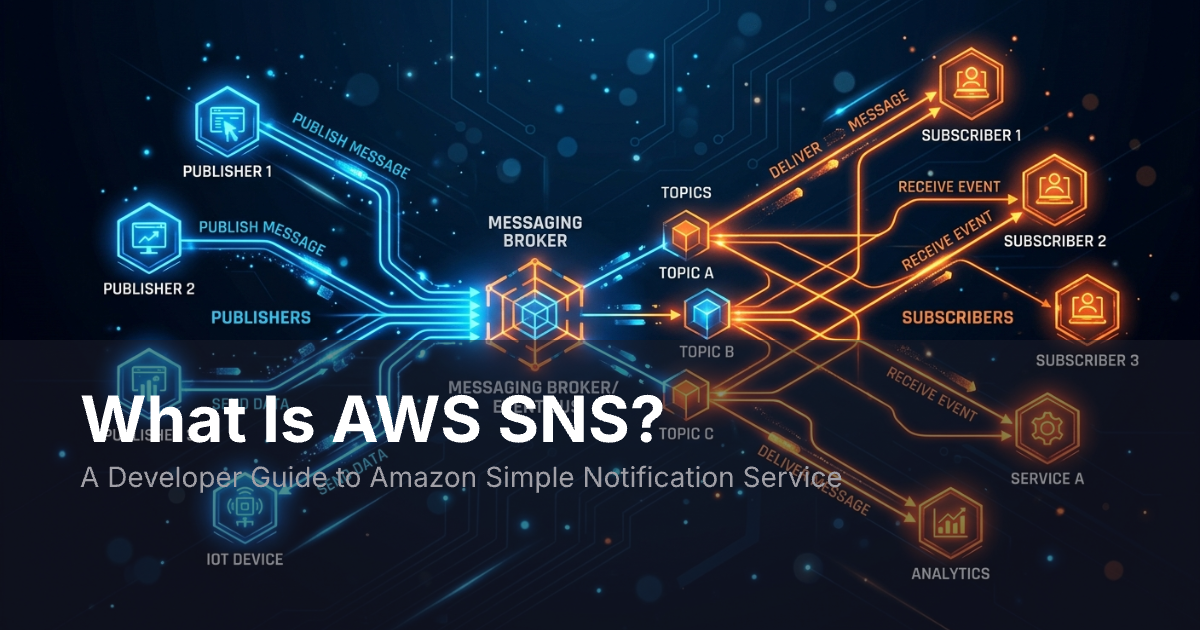
AWS SNS (Amazon Simple Notification Service) is a managed pub/sub service that sends messages to many subscribers at once through SMS, email, push, and HTTP. It splits message senders from receivers so you can fan out events to millions of endpoints without running your own servers.
How AWS SNS Works
SNS uses a publish-subscribe model. A sender posts a message to a topic. SNS then sends that message to every subscriber on that topic. The sender does not need to know who the subscribers are.
Three core ideas drive AWS SNS.
Topics
An SNS topic is a channel that groups subscribers. When you publish a message to a topic, SNS fans it out to all active subscribers. AWS has two topic types:
- Standard topics. Best-effort ordering. At-least-once delivery. Near-limitless throughput.
- FIFO topics. Strict ordering. Exactly-once delivery. Capped at 300 messages per second. Best when order and dedup matter.
You can set up topics through the AWS Console, the CLI, or any AWS SDK.
Subscriptions
A subscription links a topic to an endpoint. When a message lands on the topic, SNS pushes it to every subscribed endpoint. Supported types include:
- HTTP/HTTPS for webhooks.
- Email for human-readable alerts.
- SMS for text messages in 240+ countries.
- Amazon SQS for queue-based work.
- AWS Lambda for serverless triggers.
- Mobile push through APNs, FCM, and ADM.
- Amazon Kinesis Data Firehose for streaming data.
Message Filtering
Not every subscriber needs every message. Filter policies let you set JSON rules on each subscription. Only messages that match the filter reach that subscriber. This cuts noise and saves money since you pay per delivery.
Common Use Cases
AWS SNS works best for system-level messaging.
App-to-app fan-out
One event triggers many services at once. An order event fans out to billing, inventory, and analytics through a single publish call.
Monitoring alerts
CloudWatch alarms post to SNS topics when metrics cross a threshold. Ops teams subscribe with email or SMS to hear about CPU spikes, disk usage, or failed health checks.
Mobile and web push
SNS can send push notifications to iOS, Android, and web devices. You register device tokens and publish messages. SNS routes them through APNs or FCM.
Serverless workflows
Lambda functions subscribe to SNS topics to process events with no servers to manage. Step Functions can publish to topics to run complex flows across services.
AWS SNS Pricing
SNS uses pay-as-you-go pricing with no upfront fees. The free tier covers one million API requests per month.
After the free tier, costs depend on the delivery type:
| Delivery type | Rough cost |
|---|---|
| API requests (publish, subscribe) | $0.50 per million |
| HTTP/HTTPS deliveries | $0.60 per million |
| Email deliveries | $2.00 per 100,000 |
| SMS deliveries | Varies by country ($0.00645/msg in the US) |
| Mobile push deliveries | $0.50 per million |
| SQS/Lambda deliveries | No extra SNS charge |
SMS pricing varies by country and message type. Since November 2024, SMS charges show up under AWS End User Messaging on your bill.
You may also pay for KMS encryption, cross-region data transfer, or S3 storage if you use the Extended Client Library.
SNS vs. SES vs. Pinpoint
AWS has several services that send messages. Each one serves a different need.
| Feature | SNS | SES | Pinpoint |
|---|---|---|---|
| Main purpose | Pub/sub messaging | Email sending | Marketing campaigns |
| Channels | SMS, push, email, HTTP, SQS, Lambda | Email only | Email, SMS, push, voice |
| Message model | Fan-out to subscribers | Direct send | Segmented campaigns |
| User preferences | None | Suppression lists | Preference center |
| Analytics | CloudWatch metrics | Bounce/complaint stats | Campaign dashboards |
| Best for | System events, infra alerts | Password resets, receipts | Marketing flows |
SNS handles system-to-system messaging. SES focuses on email with high inbox rates. Pinpoint is built for marketing teams who need segments and campaigns.
Most apps use more than one of these services.
Where AWS SNS Falls Short for End Users
AWS SNS is great for system pub/sub. But it falls short when you need to build a notification system for end users. Here are the main gaps.
No inbox
SNS sends a message and moves on. There is no stored inbox where users can view, manage, or mark items as read. If your product needs an in-app feed, you must build it yourself.
No user preferences
Users expect to pick which channels they hear from and what types of alerts they get. SNS has no concept of per-user settings. You must build storage, logic, and a settings UI on your own.
No smart routing
SNS sends to whatever protocol a subscription uses. It cannot choose between push, email, or in-app based on context, time of day, or user behavior. That logic has to live in your app code.
No cross-channel fallback
A good notification system sends a push first, then falls back to email if the user does not open it. SNS topics are standalone. Building fallback chains or escalation flows takes custom code.
Limited tracking
SNS gives you CloudWatch metrics at the topic level. It does not track delivery per user or per message. Debugging why one user missed one alert means sifting through logs across multiple services.
No templates or branding
SNS sends raw payloads. There are no templates, no brand styles, and no way to preview how a message looks. Each consumer must handle its own rendering.
When to Pair SNS with a Notification Platform
AWS SNS is the right tool for system pub/sub. It splits services apart, triggers Lambda functions, and moves infra events at scale. That is what it was built for.
User-facing notifications are a different problem. Users expect a unified inbox, channel preferences, read/unread state, and clear branding. Building all of that on SNS means writing thousands of lines of custom code.
MagicBell fills that gap. It handles the user-facing layer: multi-channel delivery across push, email, SMS, and in-app; a drop-in inbox component; user preference management; and per-notification tracking. SNS keeps routing infra events while MagicBell turns those events into polished alerts that reach the right user on the right channel.
A common pattern works like this:
- Your backend posts an event to an SNS topic.
- A Lambda subscriber picks up the event and calls the MagicBell API.
- MagicBell routes the alert to each user based on their preferences. It can deliver through push, email, in-app, or all three.
This split keeps system messaging in AWS and user-facing logic in a tool built for that job. You skip building inbox UIs, preference engines, and fallback chains from scratch.
Key Takeaways
- AWS SNS is a managed pub/sub service that fans out messages to subscribers through SMS, email, push, HTTP, SQS, and Lambda.
- Topics and subscriptions form the core model. Filter policies cut noise by routing only matching messages to each subscriber.
- The free tier covers one million requests per month. After that, costs scale by delivery type.
- SNS fits system messaging. For user-facing alerts with inboxes, preferences, and cross-channel delivery, pair it with a platform like MagicBell.