
GitHub webhooks let your apps react to repository events in real time. When someone opens a pull request, pushes code, or reports a bug, GitHub sends an HTTP POST to your server with all the event details. No polling required.
This guide covers setup, event types, security, and production patterns. You'll learn to handle pull requests, issues, CI/CD events, and security alerts. We also show no-code alternatives using MagicBell workflows for teams that want automation without custom servers.
What Are GitHub Webhooks?
A GitHub webhook is an HTTP callback. You give GitHub a URL. When something happens in your repo, GitHub sends a POST request to that URL with event data in JSON format.
Think of it as a notification system for your apps. Instead of asking GitHub "did anything change?" over and over, GitHub tells you the moment something happens.
Why Use Webhooks?
- Instant updates: Events arrive the moment they happen.
- No polling needed: Save API rate limits and server resources.
- Easy automation: Trigger builds, notifications, and workflows on any event.
- Better team awareness: Keep everyone informed about repo activity.
GitHub supports 73+ webhook events. They cover everything from code pushes to security alerts.
Webhooks vs GitHub Actions vs Polling
These three approaches solve different problems. Here's how they compare:
| Feature | Webhooks | GitHub Actions | API Polling |
|---|---|---|---|
| Trigger | Real-time push from GitHub | Event-driven, runs in GitHub | Your app checks on a schedule |
| Runs where | Your server | GitHub's servers | Your server |
| Latency | Milliseconds | Seconds to minutes (queue time) | Depends on poll interval |
| Cost | Free (you host the endpoint) | Free tier, then per-minute billing | Free (API calls count toward rate limit) |
| Best for | External integrations, notifications | CI/CD, code automation | Simple checks, backup monitoring |
| Complexity | Medium (server + security) | Low (YAML config) | Low (cron job) |
Use webhooks when you need to send data to external systems like Slack, Jira, or your own app. Use GitHub Actions when the work happens inside GitHub (tests, deploys, labeling). Use polling as a fallback when webhooks aren't an option.
How GitHub Webhooks Work
Here's what happens when a GitHub event triggers a webhook:
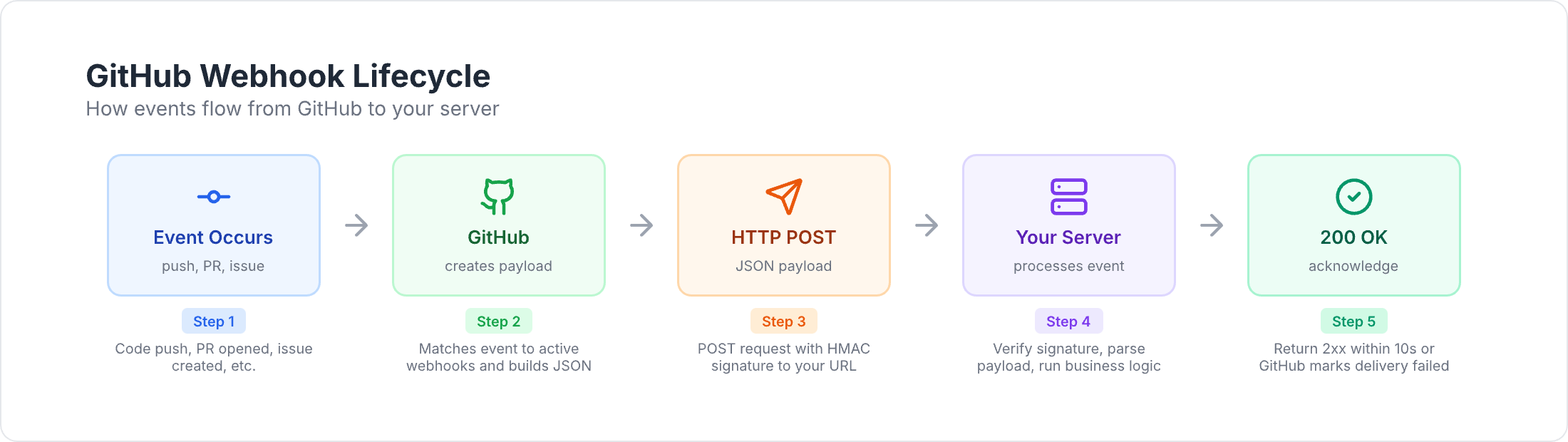
- An event occurs. A developer pushes code, opens a PR, or creates an issue.
- GitHub builds the payload. It gathers event data into a JSON object.
- GitHub signs the payload. It creates an HMAC signature using your webhook secret.
- GitHub sends an HTTP POST. The payload goes to your webhook URL.
- Your server receives it. Your endpoint validates the signature and reads the data.
- Your server responds. Return a 2xx status code within 10 seconds.
This whole flow takes milliseconds.
Webhook Payload Structure
Every delivery includes these parts:
Headers:
X-GitHub-Event— the event type (e.g.,pull_request,issues,push).X-GitHub-Delivery— a unique ID for this delivery.X-Hub-Signature-256— HMAC signature for verification.User-Agent— always starts withGitHub-Hookshot/.
JSON body:
action— what happened (e.g.,opened,closed,synchronize).- Event-specific data (PR details, issue info, commit data).
repository— the repo where the event happened.sender— the user who triggered it.
Pull Request Payload Labels Array
Many teams automate workflows based on PR labels. The labels array in a pull_request event looks like this:
{
  "action": "labeled",
  "pull_request": {
    "number": 42,
    "title": "Add new feature",
    "labels": [
      {
        "id": 1234567,
        "node_id": "MDU6TGFiZWwxMjM0NTY3",
        "url": "https://api.github.com/repos/owner/repo/labels/bug",
        "name": "bug",
        "color": "d73a4a",
        "default": true,
        "description": "Something isn't working"
      },
      {
        "id": 7654321,
        "node_id": "MDU6TGFiZWw3NjU0MzIx",
        "url": "https://api.github.com/repos/owner/repo/labels/priority-high",
        "name": "priority-high",
        "color": "ff0000",
        "default": false,
        "description": "Needs immediate attention"
      }
    ],
    "user": {
      "login": "developer123"
    }
  },
  "repository": {
    "full_name": "owner/repo"
  }
}
Each label object has id, name, color, description, and default fields. Use labels.map(l => l.name) to get a flat list of label names for filtering.
The same labels array structure appears in issues events and in the push event's commit data when commits reference labeled issues.
Setting Up GitHub Webhooks
You can set up webhooks through GitHub's web interface or API.
Step-by-Step Configuration
- Go to your repository on GitHub.
- Click Settings → Webhooks → Add webhook.
- Fill in the fields:
- Payload URL — your endpoint (must be HTTPS in production).
- Content type — select
application/json. - Secret — a strong random string for signature verification.
- SSL verification — keep enabled.
- Events — choose which events to receive.
Which Events to Subscribe To
GitHub offers three options:
- Just the push event — the default. Good for simple deploy triggers.
- Send me everything — all 73+ events. Useful for exploring, but noisy.
- Let me select individual events — the best choice for production. Subscribe only to what you need.
Start with specific events. You can always add more later.
Webhook URL Requirements
Your endpoint must:
- Use HTTPS (not HTTP).
- Respond within 10 seconds.
- Return a 2xx status code.
- Be publicly accessible.
For local development, use a tunneling tool to expose localhost. We cover this in the testing section.
GitHub Webhook Event Types
GitHub groups its 73+ events into several categories. Here are the most useful ones.
Pull Request Events
The pull_request event covers the full PR lifecycle:
opened— new PR created.closed— PR closed (checkmergedfield to tell merged from closed).synchronize— new commits pushed to the PR branch.ready_for_review— draft PR marked ready.labeled/unlabeled— label added or removed.assigned— reviewer or assignee added.edited— title, description, or base branch changed.
Related events:
pull_request_review— code reviews (submitted,dismissed).pull_request_review_comment— inline code comments.
Example: notify reviewers when a PR opens.
app.post('/webhooks/github', async (req, res) => {
  const event = req.headers['x-github-event'];
  const { action, pull_request: pr } = req.body;

  if (event === 'pull_request' && action === 'opened') {
    for (const reviewer of pr.requested_reviewers || []) {
      await notify({
        to: reviewer.login,
        title: `Review needed: ${pr.title}`,
        body: `${pr.user.login} wants your review on PR #${pr.number}`,
        url: pr.html_url
      });
    }
  }

  res.status(200).send('OK');
});
Or skip the code entirely with a MagicBell PR workflow:
{
  "key": "integration.github.pull_request.opened",
  "steps": [
    {
      "command": "broadcast",
      "input": {
        "title": "Review needed: {{data.pull_request.title}}",
        "content": "{{data.pull_request.user.login}} wants your review",
        "action_url": "{{data.pull_request.html_url}}",
        "category": "code_review",
        "recipients": [
          { "external_id": "{{data.pull_request.requested_reviewers[0].login}}" }
        ]
      }
    }
  ]
}
Issue Events
The issues event tracks issue lifecycle:
opened,closed,reopened,edited.assigned/unassigned.labeled/unlabeled.transferred,pinned,deleted.
The issue_comment event fires for comments on both issues and PRs (since PRs are issues with code).
Example: alert on-call when a critical bug is filed.
if (event === 'issues' && action === 'opened') {
  const labels = issue.labels.map(l => l.name);

  if (labels.includes('bug') && labels.includes('critical')) {
    await notify({
      to: 'oncall-team',
      title: `Critical bug: ${issue.title}`,
      body: issue.body.substring(0, 200),
      url: issue.html_url,
      priority: 'urgent'
    });
  }
}
The same flow works with MagicBell issue comment workflows — no server needed.
CI/CD and Workflow Events
workflow_run— GitHub Actions workflow completed, requested, or in progress.workflow_job— individual job events (queued, started, completed).check_run/check_suite— status checks from GitHub Apps and Actions.deployment/deployment_status— deployment lifecycle events.
These events are key for keeping developers informed about build status.
Example: notify developers when CI fails.
if (event === 'workflow_run' && action === 'completed') {
  const wf = payload.workflow_run;

  if (wf.conclusion === 'failure') {
    await notify({
      to: wf.head_commit.author.name,
      title: `CI failed: ${wf.name}`,
      body: `Your commit on ${wf.head_branch} broke the build`,
      url: wf.html_url,
      priority: 'high'
    });
  }
}
Automate this with MagicBell workflow run notifications.
Security Events
dependabot_alert— vulnerability found in a dependency.code_scanning_alert— code security issue detected.secret_scanning_alert— exposed secret found in code.security_advisory— published security advisory.
Example: alert the security team on critical vulnerabilities.
if (event === 'dependabot_alert' && action === 'created') {
  const vuln = payload.alert.security_vulnerability;

  if (vuln.severity === 'critical' || vuln.severity === 'high') {
    await notify({
      to: 'security-team',
      title: `${vuln.severity} vulnerability: ${vuln.package.name}`,
      body: payload.alert.security_advisory.summary,
      url: payload.alert.html_url,
      priority: 'urgent'
    });
  }
}
Automate with MagicBell Dependabot workflows.
Repository and Code Events
push— commits pushed. Includescommitsarray,ref(branch), andforcedflag.release— releases published, edited, or deleted.create/delete— branch or tag created or removed.branch_protection_rule— protection rules changed.
Push events are the most common webhook. Use them to trigger deploys, run tests, or notify about force pushes.
Release events work well for user-facing announcements. Here's a MagicBell release workflow:
{
  "key": "integration.github.release.published",
  "steps": [
    {
      "command": "broadcast",
      "input": {
        "title": "{{data.release.name}} released",
        "content": "{{data.release.body}}",
        "action_url": "{{data.release.html_url}}",
        "category": "product_update",
        "recipients": [{ "external_id": "all-users" }]
      }
    }
  ]
}
Webhook Security
Your webhook endpoint is a public URL. Anyone could send fake requests to it. GitHub uses HMAC signatures to prove a delivery is real.
How Signature Verification Works
- GitHub hashes the payload using your webhook secret and SHA-256.
- GitHub puts the hash in the
X-Hub-Signature-256header. - Your server computes the same hash.
- If they match, the request is authentic.
Node.js Verification Example
const crypto = require('crypto');

function verifySignature(req, secret) {
  const sig = req.headers['x-hub-signature-256'];
  if (!sig) return false;

  const hmac = crypto.createHmac('sha256', secret);
  const expected = 'sha256=' + hmac.update(req.rawBody).digest('hex');

  return crypto.timingSafeEqual(
    Buffer.from(sig),
    Buffer.from(expected)
  );
}
Always use crypto.timingSafeEqual() to prevent timing attacks. Never use === for signature comparison.
More Security Tips
- Store your webhook secret in environment variables. Never commit it to code.
- Use HTTPS for all webhook URLs.
- Rotate secrets on a regular schedule.
- Add rate limiting to your endpoint.
- Validate the payload structure after checking the signature.
- Use the
X-GitHub-Deliveryheader as an idempotency key to handle duplicate deliveries.
Building a Production Webhook Handler
Here's a full Express.js handler with security, idempotency, and async processing:
const express = require('express');
const crypto = require('crypto');

const app = express();
const SECRET = process.env.GITHUB_WEBHOOK_SECRET;

app.use(express.json({
  verify: (req, res, buf) => { req.rawBody = buf.toString('utf8'); }
}));

function checkSignature(req, res, next) {
  const sig = req.headers['x-hub-signature-256'];
  if (!sig) return res.status(401).send('Missing signature');

  const hmac = crypto.createHmac('sha256', SECRET);
  const expected = 'sha256=' + hmac.update(req.rawBody).digest('hex');

  if (!crypto.timingSafeEqual(Buffer.from(sig), Buffer.from(expected))) {
    return res.status(401).send('Bad signature');
  }

  next();
}

const seen = new Set();

app.post('/webhooks/github', checkSignature, async (req, res) => {
  const id = req.headers['x-github-delivery'];
  const event = req.headers['x-github-event'];

  if (seen.has(id)) return res.status(200).send('Already handled');
  seen.add(id);

  // Respond fast, then process in the background
  res.status(200).send('OK');

  try {
    await handleEvent(event, req.body);
  } catch (err) {
    console.error(`Webhook ${id} failed:`, err);
  }
});

async function handleEvent(event, data) {
  switch (event) {
    case 'pull_request': return handlePR(data);
    case 'issues':       return handleIssue(data);
    case 'workflow_run': return handleCI(data);
    case 'push':         return handlePush(data);
  }
}

async function handlePR(data) {
  if (data.action === 'opened') {
    console.log(`New PR #${data.pull_request.number}: ${data.pull_request.title}`);
  }
}

async function handleIssue(data) {
  if (data.action === 'opened') {
    const labels = data.issue.labels.map(l => l.name);
    console.log(`New issue #${data.issue.number}, labels: ${labels.join(', ')}`);
  }
}

async function handleCI(data) {
  if (data.action === 'completed' && data.workflow_run.conclusion === 'failure') {
    console.log(`CI failed: ${data.workflow_run.name}`);
  }
}

async function handlePush(data) {
  const branch = data.ref.replace('refs/heads/', '');
  console.log(`${data.commits.length} commits pushed to ${branch}`);
}

app.listen(process.env.PORT || 3000);
This handler covers:
- HMAC signature verification.
- Idempotency via delivery IDs.
- Fast response (under 10 seconds).
- Async event processing.
- Clean error handling.
For production, replace the in-memory Set with Redis and add a job queue (like Bull or BullMQ) for reliable processing.
Testing GitHub Webhooks Locally
GitHub can't reach localhost. You need a tunnel to expose your local server.
Tunneling Tools
ngrok (most popular):
ngrok http 3000
Cloudflare Tunnel (free):
cloudflared tunnel --url http://localhost:3000
localtunnel (open source):
npx localtunnel --port 3000
Copy the public URL and use it as your webhook URL in GitHub settings.
Inspecting Deliveries in GitHub
GitHub logs every webhook delivery. Go to Settings → Webhooks → Recent Deliveries to see:
- Request headers and full payload.
- Response status and body.
- Timing data.
- A Redeliver button to replay the same payload.
Use redelivery to test your handler without triggering real events.
Quick Testing with Webhook.site
Webhook.site gives you a disposable URL instantly. Point your GitHub webhook there to inspect payloads before writing any code. For a no-signup alternative, debug GitHub webhook payloads with our free webhook tester.
GitHub Webhook Integration Patterns
Webhooks become powerful when you connect them to other tools. Here are common integration patterns:
- Slack notifications — post PR reviews, CI failures, and security alerts to team channels. See our GitHub Slack integration guide.
- Jira updates — move tickets when PRs are merged or issues are closed.
- Deployment triggers — kick off deploys when code lands on
main. - Monitoring dashboards — track commit frequency, PR cycle time, and deploy success rates.
- Notification inboxes — use MagicBell to route GitHub events to in-app, email, Slack, and push channels from one workflow.
MagicBell: No-Code Webhook Automation
Instead of building and hosting custom handlers, MagicBell workflows let you automate GitHub events with zero code:
- Save your GitHub webhook signing secret in MagicBell.
- Point your GitHub webhook URL to MagicBell's endpoint.
- Create workflows that trigger on specific events.
- MagicBell handles security, delivery, retries, and multi-channel notifications.
Pre-built workflow templates are available for:
- PR opened — notify reviewers.
- PR review submitted — track approvals.
- Issue comment created — triage notifications.
- Workflow run completed — build status.
- Check suite completed — test results.
- Release published — version announcements.
- Dependabot alert — vulnerability notifications.
- Code scanning alert — security findings.
Browse the complete list of GitHub workflow templates.
Troubleshooting
Webhooks not delivering?
- Check that your URL is publicly accessible (not localhost).
- Make sure you respond within 10 seconds with a 2xx status.
- Look at Settings → Webhooks → Recent Deliveries for error details.
Signature verification failing?
- Verify your secret matches what's in GitHub settings.
- Compute the HMAC on the raw request body, not the parsed JSON.
- Check for trailing whitespace in your secret.
- Use
crypto.timingSafeEqual(), not===.
Missing fields in the payload?
- Different actions have different payloads. A
closedPR includesmerged, but anopenedPR does not. - Some fields are optional and may be
null. - Use GitHub's Recent Deliveries to inspect the actual structure.
Too many webhooks?
- Uncheck "Send me everything" and pick specific events.
- Add rate limiting to your endpoint.
- Use a queue for async processing.
Frequently Asked Questions
What are webhooks on GitHub?
Webhooks are HTTP callbacks that GitHub sends to your server when events happen in a repository. When someone pushes code, opens a PR, or creates an issue, GitHub sends a POST request with event details to a URL you choose. This lets your apps react to changes in real time.
How do I trigger a GitHub webhook?
You trigger a webhook by performing the event it's subscribed to. If your webhook listens for push events, pushing a commit triggers it. You can also manually redeliver past webhooks from Settings → Webhooks → Recent Deliveries in GitHub.
What is the difference between GitHub webhooks and GitHub Actions?
Webhooks send event data to your own server for external processing. GitHub Actions run code on GitHub's servers in response to events. Use webhooks to notify external systems (Slack, Jira, your app). Use Actions for CI/CD and in-repo automation (tests, deploys, labeling).
Are GitHub webhooks free?
Yes. GitHub does not charge for webhooks. You pay only for the server that receives them. If you use MagicBell workflows, the webhook handling infrastructure is included.
What is a webhook vs an API?
An API lets your app ask a server for data (pull). A webhook lets a server send data to your app when something happens (push). With the GitHub API, you poll for changes. With webhooks, GitHub pushes changes to you instantly.
Conclusion
GitHub webhooks give your apps a real-time feed of repository events. They power everything from CI/CD notifications to security alerts to team communication.
This guide covered:
- How webhooks work — the lifecycle from event to response.
- 73+ event types across PRs, issues, CI/CD, security, and releases.
- Security — HMAC signature verification and production hardening.
- Code examples — from simple handlers to production-ready patterns.
- No-code automation — MagicBell workflows for teams that want results without custom servers.
For more on webhooks, check out:
- What is a webhook? — webhook fundamentals.
- Webhooks tutorial — getting started guide.
- Stripe webhooks guide — payment webhook automation.
- GitHub Slack integration — connect GitHub to Slack.
- GitHub workflow templates — pre-built MagicBell workflows.
Sources: