Trigger Notification Workflows on GitHub Events
Build automated notification sequences for GitHub events. Handle pull requests, issues, releases, and CI/CD with zero code.
{
  "key": "integration.github.pull_request",
  "steps": [
    {
      "if": "payload.action == 'opened'",
      "command": "broadcast",
      "input": {
        "action_url": "{{payload.pull_request.html_url}}",
        "content": "PR #{{payload.pull_request.number}} by {{payload.sender.login}} - {{payload.pull_request.additions}} additions, {{payload.pull_request.deletions}} deletions across {{payload.pull_request.changed_files}} files.",
        "overrides": {
          "providers": {
            "email": {},
            "slack": {}
          }
        },
        "recipients": [
          {
            "external_id": "code-reviewers"
          }
        ],
        "title": "New PR: {{payload.pull_request.title}}"
      }
    }
  ]
}
Trusted by 1,000+ companies




 +
+ 
Why GitHub + MagicBell Workflows
Respond to every GitHub event with the right notification at the right time.

Instant Triggers
Workflows execute automatically when GitHub webhooks arrive. No polling, no delays.

Event Data Access
Reference any GitHub webhook data in your notifications with liquid templates.

Smart Logic
Branch workflows based on event type, repository, author, labels, or any metadata.

PR Workflows
Notify reviewers, track approvals, and alert on merge conflicts automatically.

Multi-Channel
Send to in-app, email, Slack, SMS, or push notifications from a single workflow.

Zero Code Setup
Configure workflows via API or dashboard. No backend changes required.
Real GitHub Workflow Examples
Copy these workflows to handle common GitHub events.

pull_requestGithub pull_request Event Notification
Notify reviewers when a new pull request is opened. Notify the team lead if the PR has more than 500 lines changed.
{
  "key": "integration.github.pull_request",
  "steps": [
    {
      "if": "payload.action == 'opened'",
      "command": "broadcast",
      "input": {
        "action_url": "{{payload.pull_request.html_url}}",
        "content": "PR #{{payload.pull_request.number}} by {{payload.sender.login}} - {{payload.pull_request.additions}} additions, {{payload.pull_request.deletions}} deletions across {{payload.pull_request.changed_files}} files.",
        "overrides": {
          "providers": {
            "email": {},
            "slack": {}
          }
        },
        "recipients": [
          {
            "external_id": "code-reviewers"
          }
        ],
        "title": "New PR: {{payload.pull_request.title}}"
      }
    }
  ]
}check_suiteGithub check_suite Event Notification
Notify when all CI checks complete for a branch.
{
  "key": "integration.github.check_suite.completed",
  "steps": [
    {
      "command": "broadcast",
      "input": {
        "content": "All checks {{payload.check_suite.conclusion}} for {{payload.check_suite.head_branch}} in {{payload.repository.full_name}}.",
        "overrides": {
          "providers": {
            "slack": {}
          }
        },
        "recipients": [
          {
            "external_id": "engineering-team"
          }
        ],
        "title": "Check suite {{payload.check_suite.conclusion}} on {{payload.check_suite.head_branch}}"
      }
    }
  ]
}releaseGithub release Event Notification
Announce new releases to the team and stakeholders. Notify via Slack and email with release notes.
{
  "key": "integration.github.release",
  "steps": [
    {
      "if": "payload.action == 'published'",
      "command": "broadcast",
      "input": {
        "action_url": "{{payload.release.html_url}}",
        "content": "{{payload.repository.full_name}} {{payload.release.tag_name}} has been published by {{payload.sender.login}}.",
        "overrides": {
          "providers": {
            "email": {},
            "slack": {}
          }
        },
        "recipients": [
          {
            "external_id": "all-team"
          }
        ],
        "title": "Release {{payload.release.tag_name}}: {{payload.release.name}}"
      }
    }
  ]
}dependabot_alertGitHub Dependabot Alert Notification to Slack & Email
Notify security team when Dependabot detects a vulnerability.
{
  "key": "integration.github.dependabot_alert.created",
  "steps": [
    {
      "command": "broadcast",
      "input": {
        "action_url": "{{payload.alert.html_url}}",
        "content": "{{payload.alert.security_vulnerability.severity}} severity vulnerability found in {{payload.alert.dependency.package.name}} ({{payload.alert.dependency.package.ecosystem}}) in {{payload.repository.full_name}}.",
        "overrides": {
          "providers": {
            "email": {},
            "slack": {}
          }
        },
        "recipients": [
          {
            "external_id": "security-team"
          }
        ],
        "title": "Security Alert: {{payload.alert.security_advisory.summary}}"
      }
    }
  ]
}Connect GitHub to MagicBell
Forward GitHub webhooks to MagicBell to automatically trigger workflows.
How It Works
integration.github.pull_request.openedhttps://api.magicbell.com/v2/integrations/github/webhooks/incoming/YOUR_IDIssues, Pull requests, Pushes, Releases, and moreEvent data available as {{data.*}} variablesWant to inspect GitHub webhook payloads before connecting? Use the webhook request catcher to generate a temporary URL, point GitHub at it, and see exactly what data arrives.
# Save your GitHub webhook signing secret in MagicBell using CLI (alternatively, use the dashboard as shown below)
magicbell integration save_github \
  --data '{"webhook_signing_secret":"your_secret_here"}'
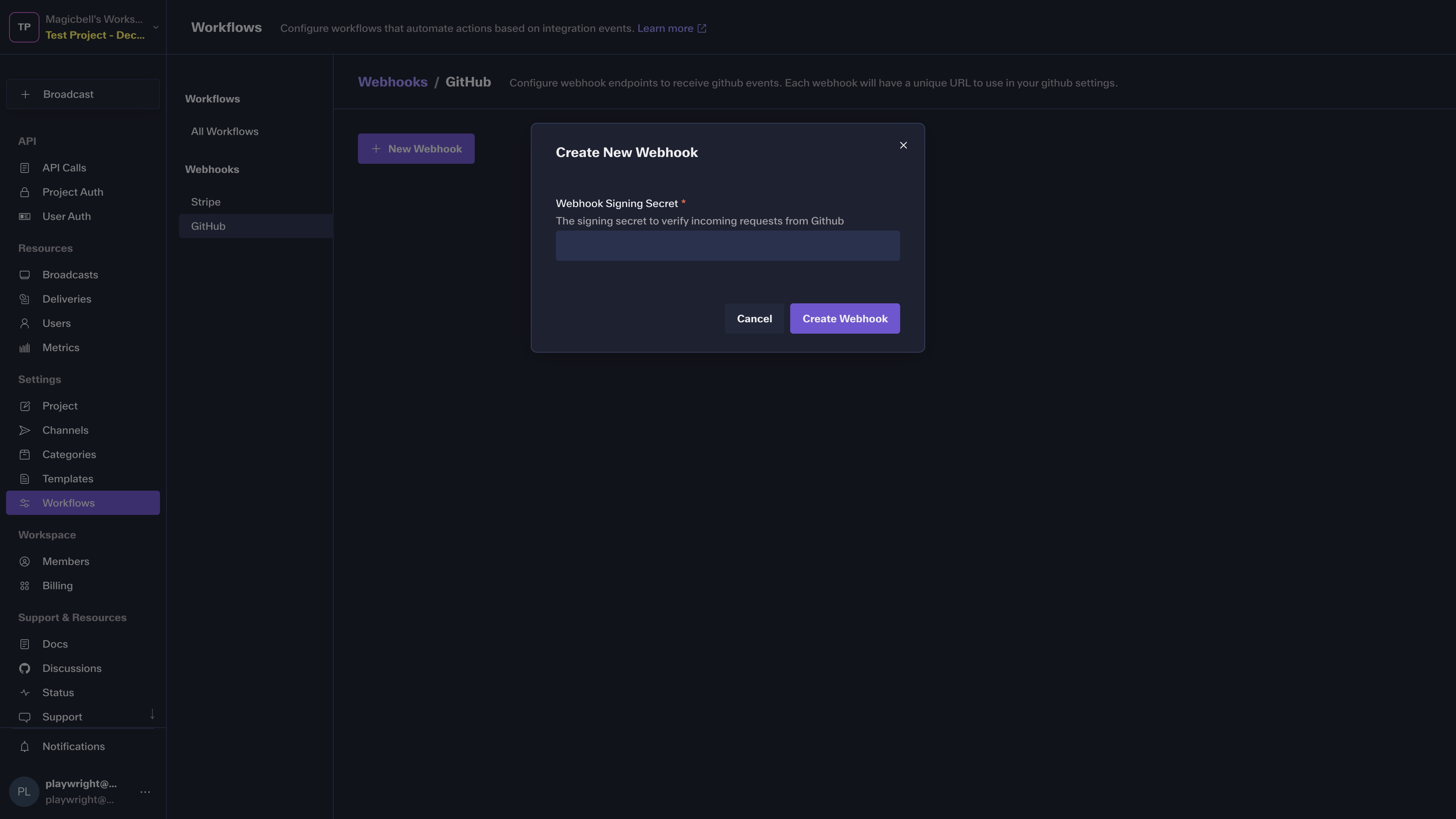
# Use the returned ID to build your webhook URL and pass to GitHub (see screenshot below)
# https://api.magicbell.com/v2/integrations/github/webhooks/incoming/{id}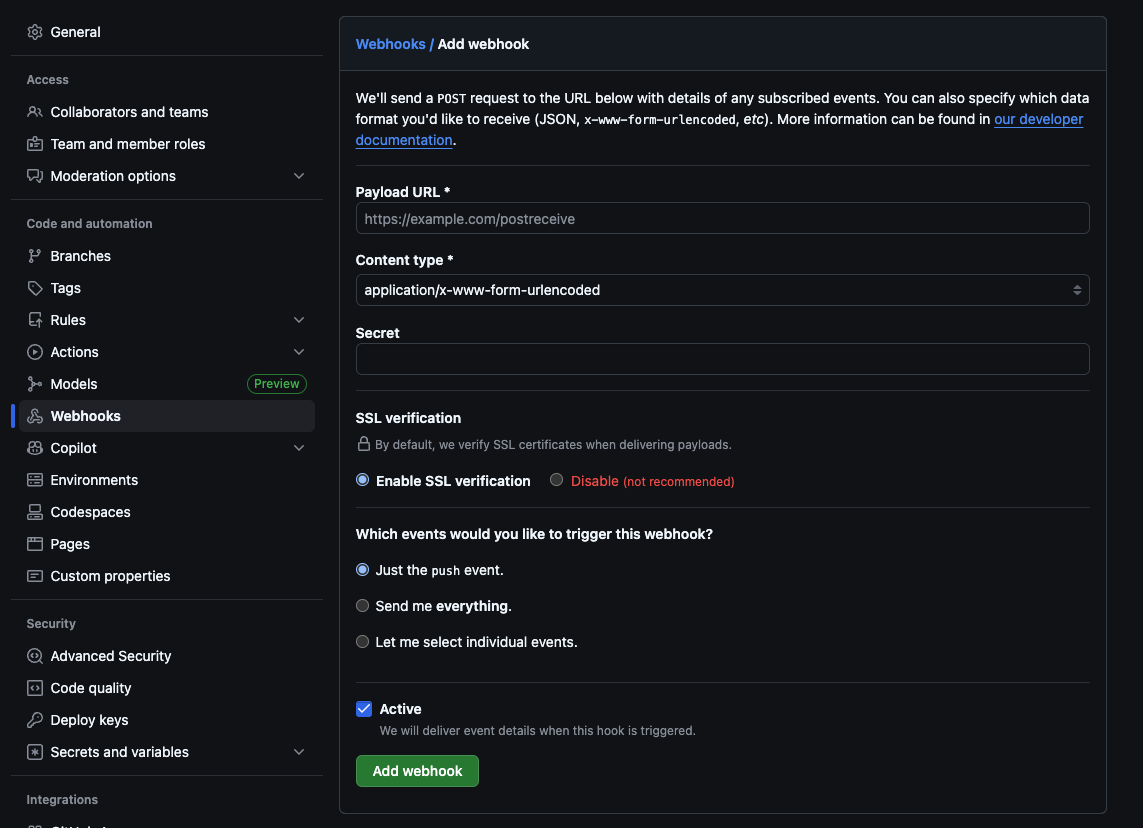
Browse Event Examples
View sample payloads and workflow configurations for 28 GitHub events.
To create a workflow for any GitHub event, use the key pattern: integration.github.{event_type}. GitHub sends the event type in the webhook header and the action in the payload body. Use an if condition to filter by action.
check_suite Notify when all CI checks complete for a branch.
code_scanning_alert Notify security team when CodeQL finds vulnerabilities in code.
delete Track branch and tag deletion. Monitor cleanup of merged branches.
dependabot_alert Notify security team when Dependabot detects a vulnerability.
deployment_protection_rule Notify approvers when deployment protection rules require approval.
deployment_status Track deployment status changes. Notify team on deployment success or failure.
discussion_comment Notify discussion authors when someone comments on their discussion.
gollum Track wiki page updates and notify documentation team.
issue_comment Notify issue authors when someone comments on their issue.
merge_group Track merge queue activity and CI checks for queued PRs.
organization_member Welcome new organization members and notify admins.
projects_v2 Notify when new GitHub Projects are created.
projects_v2_item Track when items are added to GitHub Projects.
pull_request Notify reviewers when a new pull request is opened. Notify the team lead if the PR has more than 500 lines changed.
pull_request_review_comment Notify PR authors when reviewers leave line comments.
pull_request_review Notify PR authors when their pull request is reviewed.
pull_request_review_thread Notify PR authors when review threads are resolved.
pull_request_target Handle pull requests from forks that trigger workflows in the target repository.
release Announce new releases to the team and stakeholders. Notify via Slack and email with release notes.
repository Announce new repositories to the organization.
repository_dispatch Track custom webhook events triggered via repository dispatch.
repository_vulnerability_alert Notify when vulnerability alerts are created for repository dependencies.
secret_scanning_alert Urgent notification when secrets are detected in the repository.
security_advisory Notify security team when new security advisories are published.
status Track commit status updates from external CI/CD systems.
workflow_dispatch Notify when workflows are manually triggered.
workflow_job Notify when a workflow job starts queueing. Track CI/CD pipeline progress.
workflow_run Notify when GitHub Actions workflows complete. Notify the team on deployment success or failure.
Notify Users Across All Channels
Map workflow-triggered broadcasts to notifications across multiple channels. Reach users wherever they are.

Explore More Workflows
Learn about workflow fundamentals, commands, and integrations with other platforms.

Stripe
Payment and subscription workflows
GitHub Workflow Resources
Learn more about GitHub webhooks and integrations for your workflow automation.