Twilio Channel Provider
Configuration
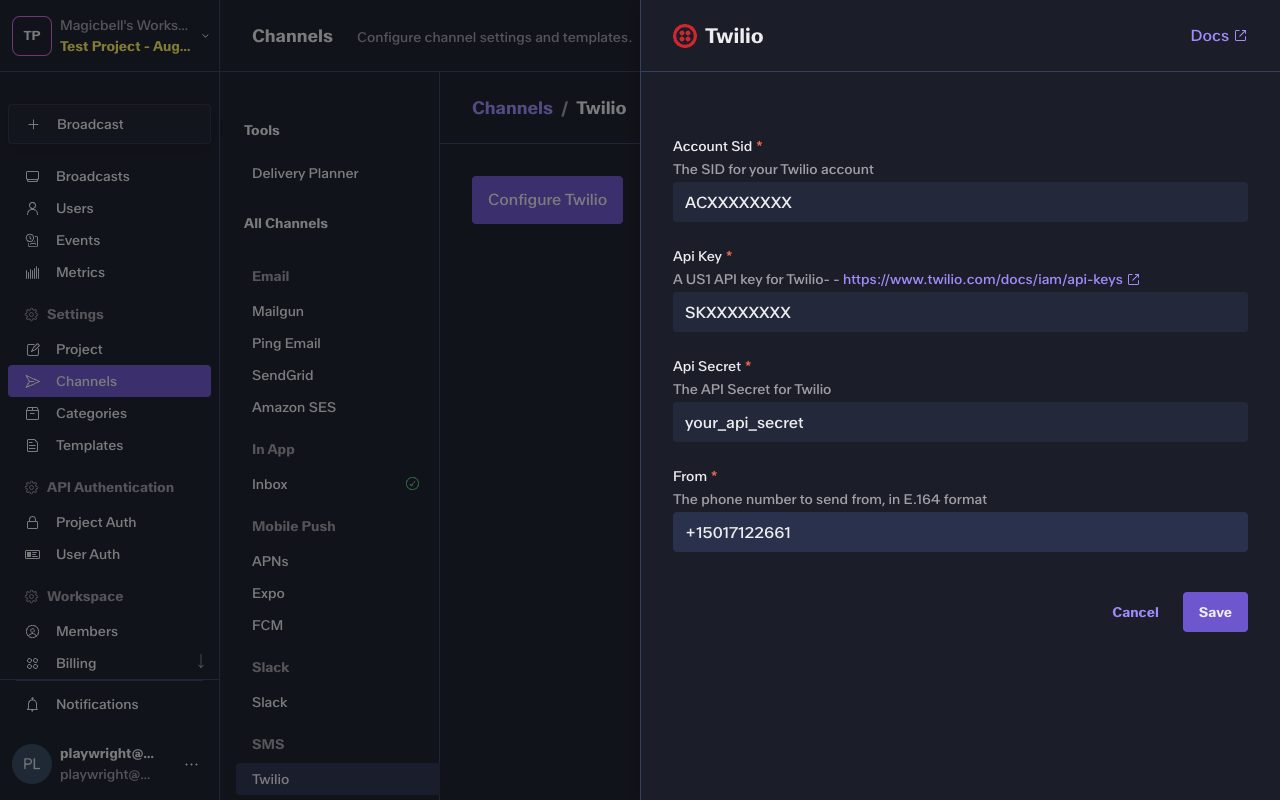
To configure the Twilio integration, you'll need the following data:
| Parameter | Type | Description |
|---|---|---|
| account_sid | string * | The SID for your Twilio account |
| api_key | string * | A US1 API key for Twilio- - https://www.twilio.com/docs/iam/api-keys |
| api_secret | string * | The API Secret for Twilio |
| from | string * | The phone number to send from, in E.164 format |
In the Dashboard
The easiest way to configure this integration is through the MagicBell dashboard:
- Log in to your MagicBell dashboard.
- Navigate to Channels.
- Find and click on this channel name in the sidebar.
- Click the Configure Twilio button.
- Follow the on-screen instructions to complete the configuration.
Using the API
Use the API to save , list and delete Twilio. For example, to save the integration:
Request
curl --request PUT \
  --url 'https://api.magicbell.com/v2/integrations/twilio' \
  --header 'content-type: application/json' \
  --header "authorization: Bearer $TOKEN" \
  --data '{"account_sid":"ACXXXXXXXX","api_key":"SKXXXXXXXX","api_secret":"your_api_secret","from":"+15017122661"}'
Debugging
To debug the integration, you can use the following tools and techniques:
- Use the Deliveries screen in the MagicBell dashboard to monitor notification deliveries and troubleshoot issues.
- To experiment with or test the Twilio API, you can use the Twilio notification tester.