FCM Channel Provider
Configuration
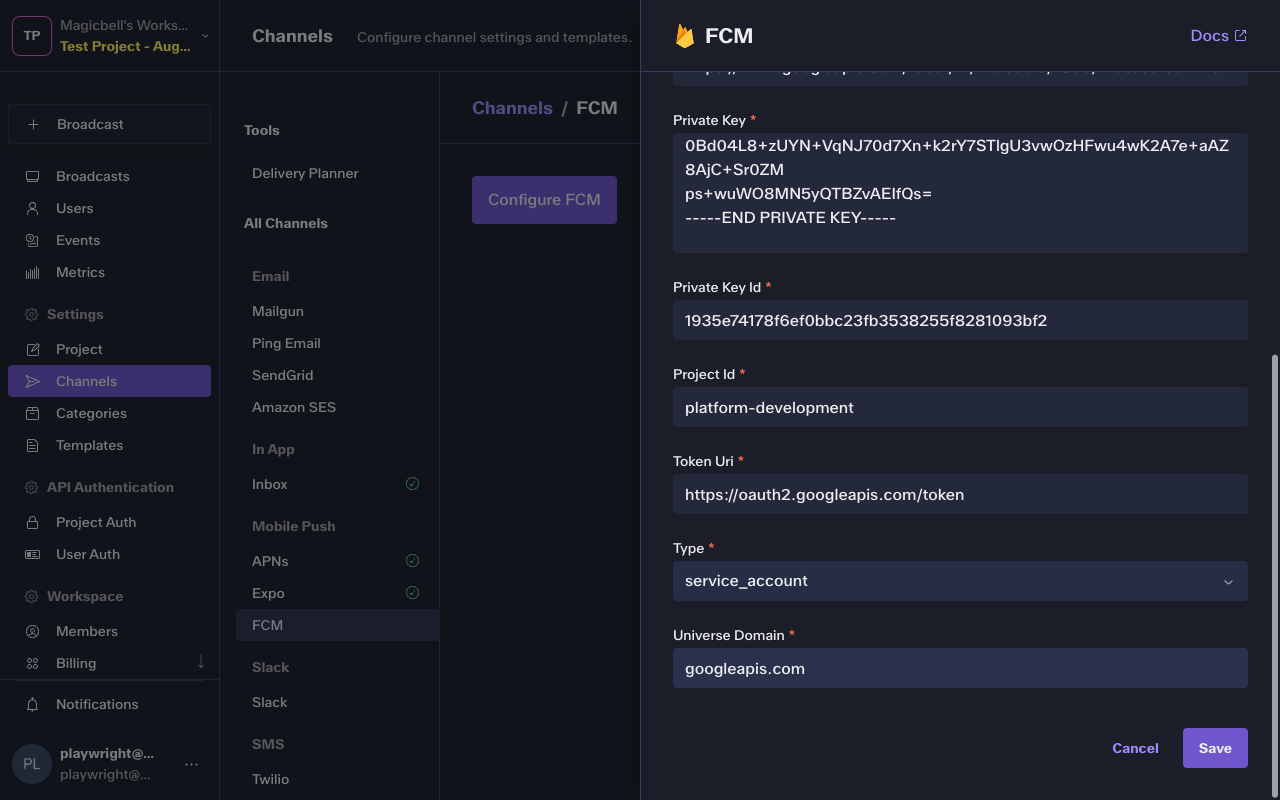
To configure the FCM integration, you'll need the following data:
| Parameter | Type | Description |
|---|---|---|
| private_key_id | string * | Identifier of the private key inside the downloaded service account JSON. |
| private_key | string * | The PEM encoded service account private key used to sign Firebase credentials. |
| client_id | string * | The numeric client identifier for the Firebase service account. |
| token_uri | string * | OAuth token endpoint used to mint access tokens for FCM. |
| project_id | string * | The Firebase project ID associated with this service account. |
| client_email | string * | The client email address from the Firebase service account. |
| auth_uri | string * | OAuth authorization endpoint used when exchanging Firebase credentials. |
| auth_provider_x509_cert_url | string * | URL for Google's OAuth provider x509 certificates used to validate tokens. |
| client_x509_cert_url | string * | URL to the public x509 certificate for this service account. |
| universe_domain | string * | The Google Cloud universe domain hosting the Firebase APIs. |
| type | string * | Indicates the kind of Google credential. Service accounts always use the service_account type. |
In the Dashboard
The easiest way to configure this integration is through the MagicBell dashboard:
- Log in to your MagicBell dashboard.
- Navigate to Channels.
- Find and click on this channel name in the sidebar.
- Click the Configure FCM button.
- Follow the on-screen instructions to complete the configuration.
Using the API
Use the API to delete , save and list FCM. For example, to save the integration:
Request
curl --request PUT \
  --url 'https://api.magicbell.com/v2/integrations/fcm' \
  --header 'content-type: application/json' \
  --header "authorization: Bearer $TOKEN" \
  --data '{"type":"service_account","project_id":"platform-development","private_key_id":"1935e74178f6ef0bbc23fb3538255f8281093bf2","private_key":"-----BEGIN PRIVATE KEY-----\nMIIEvQIBADANBgkqhkiG9w0BAQEFAASCBKcwggSjAgEAAoIBAQC7/GBHM4AK4/8c\nZyvJfdzjBzfA48tV9T3N4hBCb4E66jIz+oztH9oSngEfIVO/L1dWjK1OlN0cqJ0f\nQaKq1eycSjmwfTR3HGNjQQyoGQ4BFBdyqT5rRDDZLPI2LoR0dtQXcBtiFpJF2t8e\niDmpl3d/ipuKMtBRzjYPqzP0qv3YkPmw2v5FqKK9EIaHRtOhd2R28F5FE+kF1dvB\nt7fEeVtKcQJcSwDUQ8HEshlWSx6azGd4jxf9jHRXWumXYfTA6NMA7EUTDJVus3vU\ny9MCv2KwZO/dzlQygY0BM9FHPSzZRIiHUx+DH6gYl2uWJatluHz58lj3r5mo/Ssc\nyP3TrqOnAgMBAAECggEAWAnDe0UCt9b8QGyPBK/V1VspgMQOE+UlOzkenUaEUreg\nqFg0TM8ofaSS6OXeR0DgGdALUCyGeyf6YcuG55QFWlKmvuF8QzY/05mA2G7XcKjc\nrF3Xtju61tLmYnqZnMOT46AkquTgPyfYa3+n5aVimRAsdOYESvOUvPTUgcbc2GGK\nC2h2MUCoRKuhzbGx847XJmINRE+xaht4hDMhzhMBVrgGGyQ3sIdbCxpbiQR6QH2H\npITrSnd4hlKRPREWS/D4FUKP/ucXdORP9SUi0R64NRZ3GvT1HvpVZ9fOXwIACdAG\n9fpIQbsmIgxhgZ5ZjuGz/nFi2KQ2Y8rEycQmnHd4QQKBgQD4LVFL93E4qwr7Eruj\nFjyxGYYi2PhVxvrpiSD6ziK3HUjAxat6OcoElJx7WEFWHmi7KRgehqcl40A8Coav\n9DGBwnSM2AYKgzOqMqzjK71TFOQsJdGEYThnhiL2FoQeptgskVS7J9MMBPTnyl7D\nYObINwGbg9auVp66rj5W+dymZwKBgQDB6VdpxJpU9hXBW+8nJESduhzpYiHoe1kN\nyka90dQDOe2b/R7bnF1Ggte6Ll1dMs3xLhN1Mm2XTcX2zmzM15C0E4+1t1LXXzAo\nO2P+riEmCIUc1i0yNMVgEKXiOBBYgKauE3fT88c4dw2JAT0QlifJ0h8kRPNhUaq9\nespjleNQwQKBgHUzwZ7knn2qmSb1M9PTHppseWJfoPexXrGHZyHK064ykDcpos+4\nFuWO4U+G4GQxPDiXMaLI6IsGBUHVnsHdyruC/9O7+S5hw7Zu9CLcdy6TQSZwPcAM\nwbxyJnSdMYvgM1roz2ELb6nPdXE5qwMN8i8/euzcmDgBBDkZLKuamE+lAoGBAKb7\nvd7DAvPvBkUAWi2mub/pqUQA0ZpVvhZ1/f0wWBZ/J/KQQqZzPI+f1Q3rJ1M+kMIE\nH5Vo257TxooGsQKlD2NDBRpCx//XZK0Al9eVM86Av8BZX4pAj0dujqsEBG9yOhbl\nhObsor4pJ2q3ulIyPAk7/L1K8xr3LMUGnIqtZJcBAoGAEQffqGbnaOG8Ue3++bLP\nN6XlAyt5UajAd1CycIHgDvbW0CkWoI70Bg7QNqMYJe6DareH4vRpdB3tw6zNP7qN\n0Bd04L8+zUYN+VqNJ70d7Xn+k2rY7STlgU3vwOzHFwu4wK2A7e+aAZ8AjC+Sr0ZM\nps+wuWO8MN5yQTBZvAEIfQs=\n-----END PRIVATE KEY-----\n","client_email":"firebase-adminsdk-qwhtp@platform-development.iam.gserviceaccount.com","client_id":"117893100789081023083","auth_uri":"https://accounts.google.com/o/oauth2/auth","token_uri":"https://oauth2.googleapis.com/token","auth_provider_x509_cert_url":"https://www.googleapis.com/oauth2/v1/certs","client_x509_cert_url":"https://www.googleapis.com/robot/v1/metadata/x509/firebase-adminsdk-qwhtp%40magicbell-development.iam.gserviceaccount.com","universe_domain":"googleapis.com"}'
Channel Token
The channel token contains all the information (along with the config) necessary to deliver the notification on the FCM channel.
| Parameter | Type | Description |
|---|---|---|
| device_token | string * | The Firebase Cloud Messaging device registration token to associate with the user. |
Example
{
  "device_token": "eH0fLhuiRj2Np7UQ-opXAm:APA91bGtC-wH4sgW1jWkMKIZf7FYkm_RTQb7Jid7DfSJnCgivGYoRzhLrGxpcIF6yPjmbzAr6CKF-6phZkBasFUUfZmfdgcqfA_ZlZdVk6pSnon3LGzMumCzEJE0zgWoo_RUmVUVJUAt",
  "installation_id": "development"
}
Managing Tokens
Use the API to delete , save , fetch , fetch , list , list and delete FCM tokens. For example, to save a token:
Request
curl --request PUT \
  --url 'https://api.magicbell.com/v2/channels/mobile_push/fcm/tokens' \
  --header 'content-type: application/json' \
  --header "authorization: Bearer $TOKEN" \
  --data '{"device_token":"eH0fLhuiRj2Np7UQ-opXAm:APA91bGtC-wH4sgW1jWkMKIZf7FYkm_RTQb7Jid7DfSJnCgivGYoRzhLrGxpcIF6yPjmbzAr6CKF-6phZkBasFUUfZmfdgcqfA_ZlZdVk6pSnon3LGzMumCzEJE0zgWoo_RUmVUVJUAt","installation_id":"development"}'
Usage
1. When configured with
{
  "auth_provider_x509_cert_url": "https://www.googleapis.com/oauth2/v1/certs",
  "auth_uri": "https://accounts.google.com/o/oauth2/auth",
  "client_email": "firebase-adminsdk-qwhtp@platform-development.iam.gserviceaccount.com",
  "client_id": "117893100789081023083",
  "client_x509_cert_url": "https://www.googleapis.com/robot/v1/metadata/x509/firebase-adminsdk-qwhtp%40magicbell-development.iam.gserviceaccount.com",
  "private_key": "-----BEGIN PRIVATE KEY-----\nMIIEvQIBADANBgkqhkiG9w0BAQEFAASCBKcwggSjAgEAAoIBAQC7/GBHM4AK4/8c\nZyvJfdzjBzfA48tV9T3N4hBCb4E66jIz+oztH9oSngEfIVO/L1dWjK1OlN0cqJ0f\nQaKq1eycSjmwfTR3HGNjQQyoGQ4BFBdyqT5rRDDZLPI2LoR0dtQXcBtiFpJF2t8e\niDmpl3d/ipuKMtBRzjYPqzP0qv3YkPmw2v5FqKK9EIaHRtOhd2R28F5FE+kF1dvB\nt7fEeVtKcQJcSwDUQ8HEshlWSx6azGd4jxf9jHRXWumXYfTA6NMA7EUTDJVus3vU\ny9MCv2KwZO/dzlQygY0BM9FHPSzZRIiHUx+DH6gYl2uWJatluHz58lj3r5mo/Ssc\nyP3TrqOnAgMBAAECggEAWAnDe0UCt9b8QGyPBK/V1VspgMQOE+UlOzkenUaEUreg\nqFg0TM8ofaSS6OXeR0DgGdALUCyGeyf6YcuG55QFWlKmvuF8QzY/05mA2G7XcKjc\nrF3Xtju61tLmYnqZnMOT46AkquTgPyfYa3+n5aVimRAsdOYESvOUvPTUgcbc2GGK\nC2h2MUCoRKuhzbGx847XJmINRE+xaht4hDMhzhMBVrgGGyQ3sIdbCxpbiQR6QH2H\npITrSnd4hlKRPREWS/D4FUKP/ucXdORP9SUi0R64NRZ3GvT1HvpVZ9fOXwIACdAG\n9fpIQbsmIgxhgZ5ZjuGz/nFi2KQ2Y8rEycQmnHd4QQKBgQD4LVFL93E4qwr7Eruj\nFjyxGYYi2PhVxvrpiSD6ziK3HUjAxat6OcoElJx7WEFWHmi7KRgehqcl40A8Coav\n9DGBwnSM2AYKgzOqMqzjK71TFOQsJdGEYThnhiL2FoQeptgskVS7J9MMBPTnyl7D\nYObINwGbg9auVp66rj5W+dymZwKBgQDB6VdpxJpU9hXBW+8nJESduhzpYiHoe1kN\nyka90dQDOe2b/R7bnF1Ggte6Ll1dMs3xLhN1Mm2XTcX2zmzM15C0E4+1t1LXXzAo\nO2P+riEmCIUc1i0yNMVgEKXiOBBYgKauE3fT88c4dw2JAT0QlifJ0h8kRPNhUaq9\nespjleNQwQKBgHUzwZ7knn2qmSb1M9PTHppseWJfoPexXrGHZyHK064ykDcpos+4\nFuWO4U+G4GQxPDiXMaLI6IsGBUHVnsHdyruC/9O7+S5hw7Zu9CLcdy6TQSZwPcAM\nwbxyJnSdMYvgM1roz2ELb6nPdXE5qwMN8i8/euzcmDgBBDkZLKuamE+lAoGBAKb7\nvd7DAvPvBkUAWi2mub/pqUQA0ZpVvhZ1/f0wWBZ/J/KQQqZzPI+f1Q3rJ1M+kMIE\nH5Vo257TxooGsQKlD2NDBRpCx//XZK0Al9eVM86Av8BZX4pAj0dujqsEBG9yOhbl\nhObsor4pJ2q3ulIyPAk7/L1K8xr3LMUGnIqtZJcBAoGAEQffqGbnaOG8Ue3++bLP\nN6XlAyt5UajAd1CycIHgDvbW0CkWoI70Bg7QNqMYJe6DareH4vRpdB3tw6zNP7qN\n0Bd04L8+zUYN+VqNJ70d7Xn+k2rY7STlgU3vwOzHFwu4wK2A7e+aAZ8AjC+Sr0ZM\nps+wuWO8MN5yQTBZvAEIfQs=\n-----END PRIVATE KEY-----\n",
  "private_key_id": "1935e74178f6ef0bbc23fb3538255f8281093bf2",
  "project_id": "platform-development",
  "token_uri": "https://oauth2.googleapis.com/token",
  "type": "service_account",
  "universe_domain": "googleapis.com"
}
2. With a channel token
{
  "device_token": "eH0fLhuiRj2Np7UQ-opXAm:APA91bGtC-wH4sgW1jWkMKIZf7FYkm_RTQb7Jid7DfSJnCgivGYoRzhLrGxpcIF6yPjmbzAr6CKF-6phZkBasFUUfZmfdgcqfA_ZlZdVk6pSnon3LGzMumCzEJE0zgWoo_RUmVUVJUAt",
  "installation_id": "development"
}
3. With Broadcast
{
  "action_url": "https://example.com",
  "category": "example",
  "content": "I come from broadcast",
  "custom_attributes": {},
  "id": "d1b3b3b3-3b3b-3b3b-3b3b-3b3b3b3b3b3b",
  "overrides": {},
  "recipients": [
    {
      "custom_attributes": {
        "plan": "enterprise",
        "preferred_pronoun": "They",
        "pricing_version": "v10"
      },
      "email": "[email protected]",
      "external_id": "83d987a-83fd034",
      "first_name": "Person",
      "last_name": "Doe",
      "phone_numbers": [
        "+1 5005550001"
      ]
    }
  ],
  "title": "Hello, World!",
  "topic": "example"
}
The channel handler triggers a HTTP request
With payload
{
  "android": {
    "priority": "low"
  },
  "data": {
    "document-id": "doc-id-1",
    "nested": "{\"key\":\"value\"}",
    "notification_id": "a290290a-cb64-49e9-949a-e1a64d0ea30c",
    "user_id": "6f996951-815d-4d3d-a5b6-837810cc4615"
  },
  "notification": {
    "title": "notification title 1"
  }
}
Overrides
The provider overrides key in the broadcast payload can be used to change the default behavior of the channel handler.
overrides >> providers >> fcm
Override `android.ttl` key
Overrides
{
  "providers": {
    "fcm": {
      "android": {
        "ttl": "123456"
      }
    }
  }
}
Payload
{
  "android": {
    "priority": "high",
    "ttl": "123456s"
  },
  "data": {
    "action_url": "http://example.com/notifications/34469351-1b79-4f27-8db8-d8a65971cb77",
    "notification_id": "34469351-1b79-4f27-8db8-d8a65971cb77",
    "user_id": "2b95a48d-93fa-4c56-b395-de64c3b4871f"
  },
  "notification": {
    "title": "notification title 1"
  }
}
Debugging
To debug the integration, you can use the following tools and techniques:
- Use the Deliveries screen in the MagicBell dashboard to monitor notification deliveries and troubleshoot issues.
- To experiment with or test the FCM API, you can use the FCM notification tester.