SMTP Channel Provider
Configuration
To configure the SMTP integration, you'll need the following data:
| Parameter | Type | Description |
|---|---|---|
| host | string * | SMTP server hostname |
| port | integer * | SMTP server port |
| username | string * | SMTP authentication username |
| password | string * | SMTP authentication password |
| from | object * | Default sender email address |
| string * | Sender email address | |
| └ name | string | Sender name |
| reply_to | object | Reply-to email address |
| string * | Reply-to email address | |
| └ name | string | Reply-to name |
| security | string | SMTP security/encryption method |
In the Dashboard
The easiest way to configure this integration is through the MagicBell dashboard:
- Log in to your MagicBell dashboard.
- Navigate to Channels.
- Find and click on this channel name in the sidebar.
- Click the Configure SMTP button.
- Follow the on-screen instructions to complete the configuration.
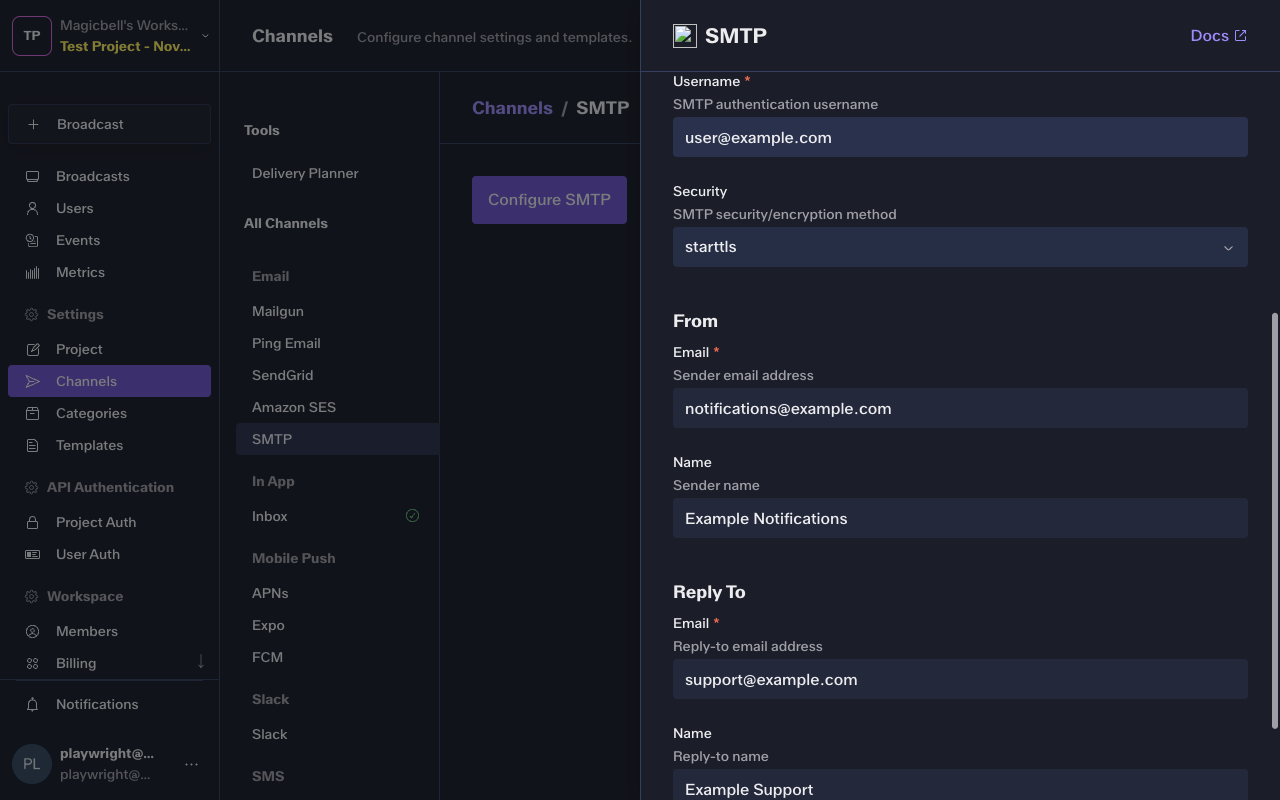
Using the API
Use the API to save , list and delete SMTP. For example, to save the integration:
Request
curl --request PUT \
  --url 'https://api.magicbell.com/v2/integrations/smtp' \
  --header 'content-type: application/json' \
  --header "authorization: Bearer $TOKEN" \
  --data '{"host":"smtp.gmail.com","port":587,"username":"[email protected]","password":"your-app-password","from":{"email":"[email protected]","name":"Example Notifications"},"reply_to":{"email":"[email protected]","name":"Example Support"},"security":"starttls"}'
Usage
1. When configured with
{
  "from": {
    "email": "[email protected]",
    "name": "Example Notifications"
  },
  "host": "smtp.gmail.com",
  "password": "your-app-password",
  "port": 587,
  "reply_to": {
    "email": "[email protected]",
    "name": "Example Support"
  },
  "security": "starttls",
  "username": "[email protected]"
}
2. With a channel token
{
  "address": "[email protected]",
  "name": "Dan"
}
3. With Broadcast
{
  "action_url": "https://example.com",
  "category": "example",
  "content": "I come from broadcast",
  "custom_attributes": {},
  "id": "d1b3b3b3-3b3b-3b3b-3b3b-3b3b3b3b3b3b",
  "overrides": {},
  "recipients": [
    {
      "custom_attributes": {
        "plan": "enterprise",
        "preferred_pronoun": "They",
        "pricing_version": "v10"
      },
      "email": "[email protected]",
      "external_id": "83d987a-83fd034",
      "first_name": "Person",
      "last_name": "Doe",
      "phone_numbers": [
        "+1 5005550001"
      ]
    }
  ],
  "title": "Hello, World!",
  "topic": "example"
}
The channel handler triggers a HTTP request
POST smtp://smtp.gmail.com:587With payload
{
  "Config": {
    "from": {
      "email": "[email protected]",
      "name": "Example Notifications"
    },
    "host": "smtp.gmail.com",
    "password": "your-app-password",
    "port": 587,
    "reply_to": {
      "email": "[email protected]",
      "name": "Example Support"
    },
    "security": "starttls",
    "username": "[email protected]"
  },
  "Message": "RnJvbTogRXhhbXBsZSBOb3RpZmljYXRpb25zIDxub3RpZmljYXRpb25zQGV4YW1wbGUuY29tPg0KVG86IERhbiA8ZGFuQGV4YW1wbGUuY29tPg0KUmVwbHktVG86IEV4YW1wbGUgU3VwcG9ydCA8c3VwcG9ydEBleGFtcGxlLmNvbT4NClN1YmplY3Q6IEhlbGxvLCBXb3JsZCENCk1JTUUtVmVyc2lvbjogMS4wDQpDb250ZW50LVR5cGU6IG11bHRpcGFydC9hbHRlcm5hdGl2ZTsgYm91bmRhcnk9ImJvdW5kYXJ5Ig0KDQotLWJvdW5kYXJ5DQpDb250ZW50LVR5cGU6IHRleHQvcGxhaW47IGNoYXJzZXQ9IlVURi04Ig0KDQpJIGNvbWUgZnJvbSBicm9hZGNhc3QNCi0tYm91bmRhcnkNCkNvbnRlbnQtVHlwZTogdGV4dC9odG1sOyBjaGFyc2V0PSJVVEYtOCINCg0KSSBjb21lIGZyb20gYnJvYWRjYXN0DQotLWJvdW5kYXJ5LS0NCg==",
  "Payload": {
    "from": {
      "email": "[email protected]",
      "name": "Example Notifications"
    },
    "html_body": "I come from broadcast",
    "reply_to": {
      "email": "[email protected]",
      "name": "Example Support"
    },
    "subject": "Hello, World!",
    "text_body": "I come from broadcast",
    "to": {
      "email": "[email protected]",
      "name": "Dan"
    }
  }
}
Debugging
To debug the integration, you can use the following tools and techniques:
- Use the Deliveries screen in the MagicBell dashboard to monitor notification deliveries and troubleshoot issues.
- To experiment with or test the SMTP API, you can use the SMTP notification tester.