APNs Channel Provider
Configuration
To configure the APNs integration, you'll need the following data:
| Parameter | Type | Description |
|---|---|---|
| certificate | string * | The APNs certificate in P8 format. Generate it at developer.apple.com with the 'Apple Push Notification service (APNs)' option selected. |
| key_id | string * | The 10-character Key ID from your Apple Developer account used with the P8 certificate. |
| team_id | string * | The Apple Developer Team ID that owns the configured key. |
| badge | string * | Controls whether the app icon badge counts unread or unseen notifications. |
| app_id | string * | The default bundle identifier of the application that is configured with this project. It can be overriden on a per token basis, when registering device tokens. |
In the Dashboard
The easiest way to configure this integration is through the MagicBell dashboard:
- Log in to your MagicBell dashboard.
- Navigate to Channels.
- Find and click on this channel name in the sidebar.
- Click the Configure APNs button.
- Follow the on-screen instructions to complete the configuration.
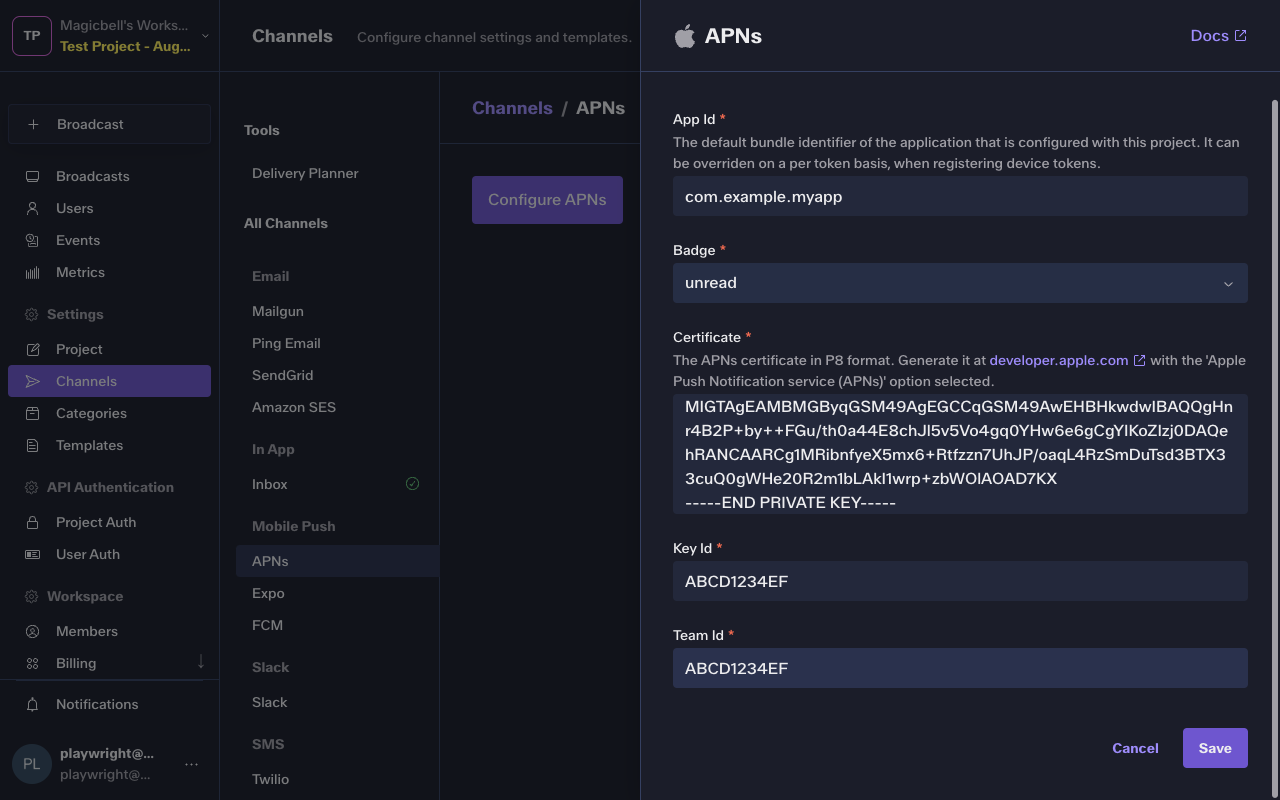
Using the API
Use the API to save , list and delete APNs. For example, to save the integration:
Request
curl --request PUT \
  --url 'https://api.magicbell.com/v2/integrations/apns' \
  --header 'content-type: application/json' \
  --header "authorization: Bearer $TOKEN" \
  --data '{"app_id":"com.example.myapp","certificate":"-----BEGIN PRIVATE KEY-----\nMIGTAgEAMBMGByqGSM49AgEGCCqGSM49AwEHBHkwdwIBAQQgHnr4B2P+by++FGu/th0a44E8chJl5v5Vo4gq0YHw6e6gCgYIKoZIzj0DAQehRANCAARCg1MRibnfyeX5mx6+Rtfzzn7UhJP/oaqL4RzSmDuTsd3BTX33cuQ0gWHe20R2m1bLAkI1wrp+zbWOlAOAD7KX\n-----END PRIVATE KEY-----","key_id":"ABCD1234EF","team_id":"ABCD1234EF","badge":"unread"}'
Channel Token
The channel token contains all the information (along with the config) necessary to deliver the notification on the APNs channel.
| Parameter | Type | Description |
|---|---|---|
| device_token | string * | The APNs device token to register with MagicBell. |
| installation_id | string | The APNs environment this token belongs to. If omitted we assume it targets production. |
| app_id | string | The bundle identifier of the application registering this token. Use this to override the default identifier configured on the APNs integration. |
Example
{
  "device_token": "eH0fLhuiRj2Np7UQ-opXAm:APA91bGtC-wH4sgW1jWkMKIZf7FYkm_RTQb7Jid7DfSJnCgivGYoRzhLrGxpcIF6yPjmbzAr6CKF-6phZkBasFUUfZmfdgcqfA_ZlZdVk6pSnon3LGzMumCzEJE0zgWoo_RUmVUVJUAt",
  "installation_id": "development"
}
Managing Tokens
Use the API to fetch , fetch , list , list , delete , delete and save APNs tokens. For example, to save a token:
Request
curl --request PUT \
  --url 'https://api.magicbell.com/v2/channels/mobile_push/apns/tokens' \
  --header 'content-type: application/json' \
  --header "authorization: Bearer $TOKEN" \
  --data '{"device_token":"eH0fLhuiRj2Np7UQ-opXAm:APA91bGtC-wH4sgW1jWkMKIZf7FYkm_RTQb7Jid7DfSJnCgivGYoRzhLrGxpcIF6yPjmbzAr6CKF-6phZkBasFUUfZmfdgcqfA_ZlZdVk6pSnon3LGzMumCzEJE0zgWoo_RUmVUVJUAt","installation_id":"development"}'
Usage
1. When configured with
{
  "app_id": "com.example.myapp",
  "badge": "unread",
  "certificate": "-----BEGIN PRIVATE KEY-----\nMIGTAgEAMBMGByqGSM49AgEGCCqGSM49AwEHBHkwdwIBAQQgHnr4B2P+by++FGu/th0a44E8chJl5v5Vo4gq0YHw6e6gCgYIKoZIzj0DAQehRANCAARCg1MRibnfyeX5mx6+Rtfzzn7UhJP/oaqL4RzSmDuTsd3BTX33cuQ0gWHe20R2m1bLAkI1wrp+zbWOlAOAD7KX\n-----END PRIVATE KEY-----",
  "key_id": "ABCD1234EF",
  "team_id": "ABCD1234EF"
}
2. With a channel token
{
  "device_token": "eH0fLhuiRj2Np7UQ-opXAm:APA91bGtC-wH4sgW1jWkMKIZf7FYkm_RTQb7Jid7DfSJnCgivGYoRzhLrGxpcIF6yPjmbzAr6CKF-6phZkBasFUUfZmfdgcqfA_ZlZdVk6pSnon3LGzMumCzEJE0zgWoo_RUmVUVJUAt",
  "installation_id": "development"
}
3. With Broadcast
{
  "action_url": "https://example.com",
  "category": "example",
  "content": "I come from broadcast",
  "custom_attributes": {},
  "id": "d1b3b3b3-3b3b-3b3b-3b3b-3b3b3b3b3b3b",
  "overrides": {},
  "recipients": [
    {
      "custom_attributes": {
        "plan": "enterprise",
        "preferred_pronoun": "They",
        "pricing_version": "v10"
      },
      "email": "[email protected]",
      "external_id": "83d987a-83fd034",
      "first_name": "Person",
      "last_name": "Doe",
      "phone_numbers": [
        "+1 5005550001"
      ]
    }
  ],
  "title": "Hello, World!",
  "topic": "example"
}
The channel handler triggers a HTTP request
POST https://api.sandbox.push.apple.com/3/device/eH0fLhuiRj2Np7UQ-opXAm:APA91bGtC-wH4sgW1jWkMKIZf7FYkm_RTQb7Jid7DfSJnCgivGYoRzhLrGxpcIF6yPjmbzAr6CKF-6phZkBasFUUfZmfdgcqfA_ZlZdVk6pSnon3LGzMumCzEJE0zgWoo_RUmVUVJUAtWith payload
{
  "action-url": "https://example.com",
  "aps": {
    "alert": {
      "body": "I come from broadcast",
      "title": "Hello, World!"
    }
  },
  "custom-attributes": {}
}
Overrides
The provider overrides key in the broadcast payload can be used to change the default behavior of the channel handler.
overrides >> providers >> apns
Override `aps` key
Overrides
{
  "providers": {
    "apns": {
      "aps": {
        "alert": {
          "launch-image": "launch image",
          "loc-args": [
            "loc",
            "args"
          ],
          "loc-key": "loc key",
          "title-loc-args": [
            "title",
            "loc",
            "args"
          ],
          "title-loc-key": "title loc key"
        },
        "content-available": 1,
        "sound": "my_sound"
      }
    }
  }
}
Payload
{
  "action-url": "https://example.com",
  "aps": {
    "alert": {
      "body": "I come from broadcast",
      "launch-image": "launch image",
      "loc-args": [
        "loc",
        "args"
      ],
      "loc-key": "loc key",
      "title": "Hello, World!",
      "title-loc-args": [
        "title",
        "loc",
        "args"
      ],
      "title-loc-key": "title loc key"
    },
    "content-available": 1,
    "sound": "my_sound"
  },
  "custom-attributes": {}
}
Override `mutable-content` key
Overrides
{
  "providers": {
    "apns": {
      "mutable-content": 1
    }
  }
}
Payload
{
  "action-url": "https://example.com/notifications/0194a896-64fb-79ab-b7a0-3289c2b79675",
  "aps": {
    "alert": {
      "body": "Content body",
      "title": "John Doe mentioned you in a PR"
    }
  },
  "custom-attributes": {
    "audience": "user",
    "body": "Content body",
    "document": {
      "comment-id": "ff002c29-3279-4f60-a427-ea596412204a",
      "document-id": "843c7692-39bd-41ed-b841-2a873f0a9b7c",
      "slide-id": "bb951254-9388-4029-ae6d-003dde9c97df",
      "workspace-id": "c0d4647a-0ee4-40ec-b9f5-334e567e7e02"
    },
    "html-body": "\\u003cp\\u003eContent body\\u003c/p\\u003e",
    "html-title": "\\u003cb\\u003eJohn Doe\\u003c/b\\u003e mentioned you in \\u003cb\\u003ea PR\\u003c/b\\u003e",
    "sender": {
      "profile-picture-url": "https://example.com/profile/test-user.png",
      "username": "John Doe"
    },
    "source": "direct",
    "title": "John Doe mentioned you in a PR",
    "type": "comment-mention"
  }
}
Debugging
To debug the integration, you can use the following tools and techniques:
- Use the Deliveries screen in the MagicBell dashboard to monitor notification deliveries and troubleshoot issues.
- To experiment with or test the APNs API, you can use the APNs notification tester.